Evaluating the Axoma Template for Google Slides: A Practical Analysis
In the landscape of digital presentation tools, pre-designed templates serve as a critical bridge between conceptual ideas and polished, professional slides. Among the myriad options available specifically for Google Slides, the Axoma Google Slide Template presents itself as a comprehensive solution. For professionals weighing their choices, understanding what a template like Axoma offers, its inherent tradeoffs, and the situations where it excels or falls short is essential for making an informed resource selection.
What Is the Axoma Google Slide Template?
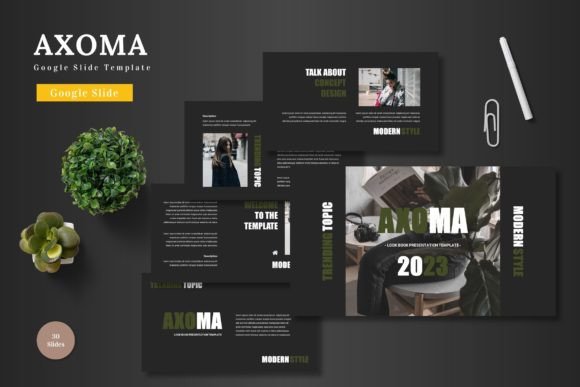
The Axoma template is a pre-built framework for Google Slides, comprising 150 total slides organized across five distinct color schemes. Its design philosophy emphasizes cleanliness, scalability, and visual appeal, aiming to be a multipurpose asset. It is promoted as suitable for various contexts, including business pitches, e-commerce showcases, and product promotions. A core selling point is its deep integration with Google Slides' native editing environment; all elements, from shapes to infographics, are editable within the platform itself, eliminating the need for auxiliary software like PowerPoint or advanced graphic design tools.
Distinct Characteristics and Core Features
Several features define the Axoma Google Slide Template and set it apart from more basic or niche offerings. The inclusion of 30 slides per color variation provides substantial volume, reducing the need to create slides from scratch. The template employs handcrafted, pixel-perfect illustrations and infographics, which are resizable and editable directly via Google Slides' shape tools. This addresses a common frustration where template graphics are static images, locking users into a fixed design. Practical features like dedicated picture placeholders for drag-and-drop image replacement, along with gallery and portfolio slides, streamline the content insertion process. Notably, the main downloadable file includes five separate PPTX files, which is somewhat unusual for a Google Slides-focused product but allows for potential conversion or use in PowerPoint, offering a degree of format flexibility.
Comparing Axoma to General Template Approaches
When evaluating presentation templates, users typically consider several broad categories: free default templates within tools like Google Slides, premium marketplace templates (like Axoma), and fully custom designs created by a graphic artist. The Axoma Google Slide Template sits firmly in the premium marketplace segment.
Compared to Google Slides' own free templates, Axoma offers significantly more specialized structure and visual depth. The free options are often adequate for internal meetings but can lack the polished, brand-aligned aesthetics needed for client-facing or investor presentations. Axoma's 150 slides and coordinated color systems provide a cohesive visual language from start to finish, which is difficult to achieve by piecing together free slides.
Against the alternative of hiring a designer for a custom template, the Axoma template represents a substantial tradeoff between cost and control. A custom design provides ultimate uniqueness and brand specificity. The Axoma Google Slide Template, while editable, operates within a predefined visual framework. Its strength is in offering a high-quality, professional baseline at a fraction of the cost and time investment of a custom project. For organizations or individuals without dedicated design resources, this can be a compelling compromise.
Strengths and Potential Limitations
The Axoma template's primary strengths are its comprehensiveness, ease of use, and design quality. The fact that all editing occurs within Google Slides removes technical barriers for users familiar with that ecosystem. The "all-in-one" nature—including infographics, section breaks, and animated slides—means a user can theoretically build a complete presentation without sourcing external assets. The five color variations also allow for some thematic adaptation without departing from the template's core geometry.
Potential limitations arise from its very nature as a pre-packaged product. While colors and images can be changed, the underlying layout structures and illustration styles are fixed. This might not align perfectly with a company's existing brand guidelines that require very specific typography or iconography. Furthermore, the inclusion of PPTX files hints at a design process possibly rooted in PowerPoint, and while elements are editable in Google Slides, there can sometimes be subtle formatting discrepancies when moving between the two platforms. Users requiring absolute, pixel-perfect consistency across every slide might find some adjustments necessary.
Determining the Best-Fit Situation for Axoma
The Axoma Google Slide Template is likely an excellent fit for several realistic scenarios. Consider a startup founder preparing a pitch deck under time pressure. They need a presentation that looks credible and investment-ready but cannot spend weeks on design. Axoma provides a credible, colorful foundation where they can focus on inserting their content, metrics, and product images into the prepared placeholders.
Similarly, a marketing professional at a small e-commerce business tasked with creating a seasonal product launch presentation would benefit from the template's gallery slides and product-focused layouts. The multipurpose claim holds here, as the template's structure can be repurposed for different promotional cycles.
It also suits individuals or teams who value consistency. Using the same template for a series of related presentations—like quarterly business updates—ensures a uniform corporate look without requiring design oversight each time.
When Might Another Option Be Necessary?
Despite its versatility, the Axoma Google Slide Template may not be the optimal choice in all circumstances. Organizations with a mature, strictly enforced visual identity might find the template's predefined color palettes and illustration style too divergent. In such cases, even with editing, achieving exact brand compliance could require more effort than starting from a company-customized master slide.
Projects demanding extreme minimalism or a highly unique, artistic aesthetic might also be better served by a custom design. The Axoma template, while clean, is inherently designed to be colorful and visually engaging, which might not align with a desire for stark simplicity.
Furthermore, users who exclusively and deeply use PowerPoint might find the process of adapting a Google Slides-centric template (even with provided PPTX files) less seamless than purchasing a template built natively and exclusively for PowerPoint's more advanced animation and formatting tools.
Key Decision Factors for Users
When researching and comparing options like the Axoma template, practical decision factors emerge. First, assess the depth of editability required. Can you work comfortably within the provided shapes and colors, or do you need to alter the fundamental grid and layout philosophy? Second, consider the volume and variety of slides needed. A template with 150 slides offers redundancy and choice, whereas a smaller template might force repetitive slide reuse. Third, evaluate the platform commitment. If your workflow is irrevocably tied to Google Slides, a template designed for its native editing capabilities, like Axoma, reduces friction. Finally, weigh the importance of ancillary assets. The included infographics and illustrations are valuable if you lack them elsewhere; if you already have a library of custom icons and charts, a simpler, more layout-focused template might suffice.
A Balanced View on Template Selection
Selecting a presentation template is seldom a binary choice between perfect and inadequate. It is an evaluation of fit, resources, and desired outcome. The Axoma Google Slide Template represents a robust, feature-rich option within the premium tier. Its value proposition is clear: it offers a significant leap in quality over free defaults while providing more structure and editable assets than many minimalist premium templates.
For the adult professional audience researching ideas and evaluating products—be it for a business pitch, an internal report, or a personal project—tools like the Axoma template exist to reduce the cognitive and time load of design. They allow the presenter to concentrate on content and narrative. The informed decision rests on honestly appraising your specific needs against the template's offerings. If your scenario calls for a versatile, visually coherent, and efficiently editable foundation within the Google Slides environment, the Axoma Google Slide Template warrants serious consideration. If your requirements lean toward strict brand sovereignty, extreme aesthetic uniqueness, or deep PowerPoint integration, your exploration of alternatives should continue.