Ceroma: Evaluating a Multipurpose Google Slides Template for Modern Presentations
In the landscape of presentation design, where time is often scarce and visual impact is paramount, templates like the Ceroma - Google Slide Template offer a structured path to a polished final product. For professionals, entrepreneurs, or educators seeking to create compelling slides efficiently, understanding what such a template provides—and where it fits among the broader array of options—is a crucial step in selecting the right resource.
The Core Proposition of Ceroma
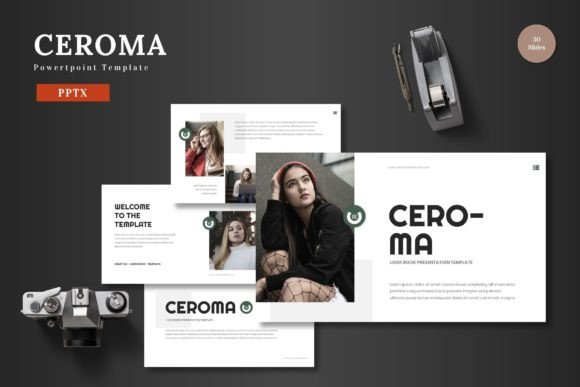
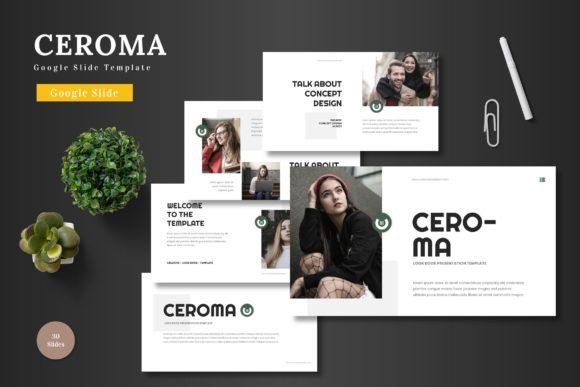
The Ceroma - Google Slide Template is fundamentally a pre-designed framework built specifically for Google Slides. Its stated purpose is to serve as a clean, scalable, and colorful multipurpose tool suitable for business presentations, pitch decks, e-commerce showcases, or product promotions. A key distinction is its commitment to operating entirely within the Google Slides environment. The template emphasizes that all elements are editable using Google Slides' native shapes and tools, eliminating the need for additional software like Adobe Illustrator or specialized graphic applications. This can be a significant advantage for teams or individuals who standardize on Google Workspace and prioritize accessibility and collaborative ease over advanced design functionality.
What makes Ceroma distinct from a simple set of blank slides with a theme is its comprehensive included content. The offering includes 150 total slides, organized into 30 slides across five different pre-made color schemes. This structure provides not just a uniform look, but a library of slide types—likely encompassing title slides, section breaks, infographics, galleries, and portfolio layouts—that users can mix, match, and modify. The inclusion of animated slides suggests attention to modern presentation dynamics, aiming to add visual interest without requiring users to build complex animations manually.
Features and Practical Utility
Examining the listed features reveals the template's intended strengths. The presence of handcrafted infographics, pixel-perfect illustrations, and resizable, editable graphics addresses a common hurdle: creating professional visual data representations. For someone without a design background, having a suite of ready-made charts, diagrams, and icons that can be tailored to their content is a substantial time-saver. The "drag and drop" picture placeholder and gallery slides further simplify the process of incorporating images, a frequent requirement in product or portfolio presentations.
The technical delivery—five separate PPTX files for the widescreen format with five color schemes—is noteworthy. While the template is for Google Slides, providing PowerPoint (PPTX) source files can indicate that the core graphics and layouts were originally crafted in a more detailed design program like PowerPoint, potentially ensuring a higher degree of graphical precision before being adapted for Google Slides. This bridges a gap, offering assets that might feel more "handcrafted" while maintaining the final editability in a simpler, web-based tool.
Strengths and Potential Tradeoffs
The primary strength of the Ceroma - Google Slide Template is its all-in-one, integrated approach within a familiar platform. It reduces the friction of starting from scratch or juggling between multiple applications. For use cases like internal business reports, client pitch decks where brand colors need to be applied quickly, or academic presentations requiring clear data visualization, Ceroma can accelerate production. Its multipurpose claim means a single purchase or download could service varied needs across an organization or individual's projects.
However, tradeoffs exist. A template with 150 pre-built slides and five color variations, while extensive, might also impose a certain stylistic boundary. Users seeking a truly unique, avant-garde, or highly brand-specific aesthetic may find the template's predefined "clean, scalable, colorful" style limiting, even with editable colors and graphics. The reliance on Google Slides' native editing tools is a double-edged sword; it guarantees accessibility but also means users are constrained by Google Slides' sometimes less granular design capabilities compared to dedicated desktop software like PowerPoint or Keynote for intricate adjustments.
Furthermore, the "multipurpose" nature means it is a generalist solution. For hyper-specific presentation types—like a complex scientific research presentation requiring bespoke notation, or a luxury brand pitch demanding minimalist, custom photography layouts—a more specialized template or custom design might be a better fit, even if it requires more time or external software.
Considering Alternatives and Decision Factors
When evaluating the Ceroma - Google Slide Template against the wider field of presentation resources, several comparison points emerge. One major category is fully custom design, either internally or through a hired designer. This path offers maximum originality and alignment with specific brand guidelines but incurs significantly higher cost and time. Another category is the use of free, basic templates provided within Google Slides or PowerPoint. These are quick and cost-free but often lack the depth of slides, polished infographics, and coordinated color schemes found in premium offerings like Ceroma.
A third category comprises premium template marketplaces offering thousands of niche templates for every conceivable scenario. Compared to these vast libraries, Ceroma’s focused bundle of 150 slides in five colors is more curated. This can be beneficial for users overwhelmed by choice, but it means Ceroma might not cover every single specialized slide layout a user could imagine. The decision often hinges on the user's recurring needs: if they consistently create presentations across business, pitching, and promotion, a robust multipurpose template like Ceroma may offer better value than purchasing several niche ones.
When Ceroma May Be the Right Choice
The Ceroma - Google Slide Template appears best-suited for professionals and teams who operate primarily in the Google ecosystem and have recurring, varied presentation needs that demand a professional look faster than blank-slide design allows. Ideal scenarios might include:
- A startup team preparing investor pitch decks, product launch slides, and internal operational updates, needing consistency across materials without a dedicated designer.
- A marketing professional who regularly creates presentations for e-commerce product promotions, client reviews, and portfolio showcases, requiring easy image integration and data visualization.
- An educator or trainer developing course materials and workshops where clear, engaging infographics and a structured flow are important.
In these situations, the template's scale, editability within Google Slides, and included visual assets directly address common pain points: time consumption, design skill gaps, and the need for visual cohesion.
When Another Option Might Be Needed
Conversely, there are scenarios where an alternative might serve better. If a user or organization's presentations demand a radical departure from standard template aesthetics—for example, a highly artistic brand or a technical field with non-standard diagramming needs—the inherent style of Ceroma, even when edited, may not suffice. Similarly, if presentations are almost exclusively built in Microsoft PowerPoint or Apple Keynote due to corporate policy or advanced feature requirements, a template native to those platforms, even if it lacks Ceroma's specific feature set, would be a more practical foundation.
Also, for users who make very few presentations, or whose presentations are exceedingly simple (e.g., text-heavy internal memos), the investment in a comprehensive premium template might not be justified compared to using simple built-in themes or free resources.
Making an Informed Selection
Choosing a presentation template is rarely about finding the single "best" option, but about finding the best fit for a specific set of constraints and goals. For the Ceroma - Google Slide Template, the decision factors weigh heavily on platform allegiance, design autonomy versus efficiency, and the diversity of presentation types one regularly creates.
A practical approach is to assess your recent presentation projects. How many required custom graphics? How often did you spend hours aligning elements or searching for suitable icons? How critical is it to maintain a consistent visual language across different presentation types? If the answers point to frequent struggles with design efficiency and a need for a versatile visual library, a multipurpose template like Ceroma becomes a strong candidate. Its bundled approach—offering structure, variety, and editability within a single, accessible tool—aims to solve those problems directly.
Ultimately, resources like the Ceroma - Google Slide Template exist to bridge the gap between professional design outcomes and practical production realities. By understanding its integrated nature, its strengths within the Google Slides environment, and the tradeoffs against more custom or more niche alternatives, users can make a more grounded decision that aligns with their actual workflow, skill set, and presentation demands.