Evaluating Google Slides - Leaded: A Practical Template for Professional Presentations
When creating a presentation, the template you choose sets the tone for your entire message. Google Slides - Leaded is a professionally designed template that aims to streamline this process for individuals and teams working across a diverse range of projects. It's positioned as a versatile solution, but its true value depends on how its specific features align with your needs. Understanding what it offers, how it compares to general approaches, and where its strengths lie can help you decide if it's the right starting point for your work.
What is Google Slides - Leaded and Its Core Distinctions
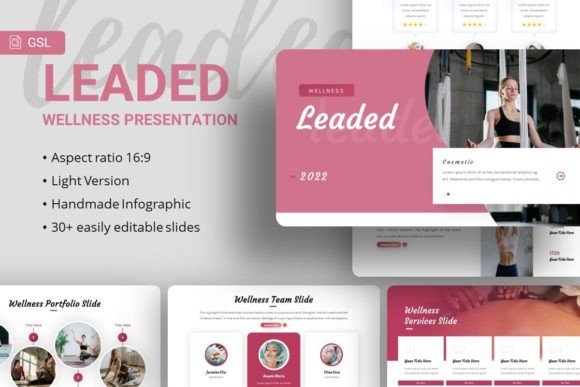
Google Slides - Leaded is not simply a collection of slides with a uniform color scheme. It is a structured presentation system built within Google Slides, consisting of 35 unique slides, master slide layouts, and a suite of customizable elements. Its distinction comes from attempting to balance ready-to-use professionalism with user flexibility.
The template is explicitly designed for a wide spectrum of purposes, from corporate business profiles and startup pitch decks to creative agency showcases and personal portfolios. This breadth is a key characteristic. Rather than being hyper-specialized for one industry, it provides a neutral, modern aesthetic that can be adapted. The handcrafted infographics, pixel-perfect illustrations, and resizable graphic elements are pre-built components intended to save design time while maintaining a cohesive visual standard. Unlike using a completely blank deck or a very basic template, Google Slides - Leaded provides a foundational design language.
Key Features and Practical Considerations
Examining the listed features reveals both capabilities and practical considerations for a potential user.
Structure and Customization
The inclusion of 35 slides for each template version means you have a substantial starting library of layouts for titles, team introductions, data points, testimonials, and portfolios. This can significantly reduce initial setup time. The claim of "easy customizable contents" and elements being "all graphic resizable and editable" hinges on the user's comfort with Google Slides' native editing tools. While more straightforward than advanced graphic software, achieving a perfectly tailored look still requires a basic understanding of how to manipulate shapes, text boxes, and image placeholders within the platform.
The "based on Master Slides" feature is a significant advantage for consistency. Changing a font or color on a master slide can propagate throughout the presentation, ensuring a uniform look—a functionality that mitigates a common pain point in ad-hoc slide design.
Assets and Resources
The template includes drag-and-drop picture placeholder functionality, which simplifies the process of inserting images. However, it’s crucial to note the provided image sources: Unsplash, Pixabay, and Pexels. These are references for where you can find compatible imagery, but the images from the demo are not included in the downloaded files. You must source your own visuals. This is a common tradeoff in premium templates: you gain a design framework but supply the content assets. The inclusion of vector icons and specific font recommendations (Karla and Courgette) provides stylistic guidance and assets that help maintain the intended aesthetic.
File Format and Accessibility
The delivery as a PowerPoint .PPTX file that can be imported into Google Slides is a practical choice. It ensures compatibility for users who might need to switch between Google Slides and Microsoft PowerPoint environments, or who prefer to start their work in one platform over the other. The accompanying documentation file is a positive indicator, suggesting guidance on how to effectively use and modify the template.
Comparing the Approach: Template vs. From-Scratch vs. Other Solutions
To evaluate Google Slides - Leaded effectively, it's useful to compare its approach to other common paths for creating presentations.
Using a Comprehensive Template like Leaded: This path offers a significant head start. You inherit a coordinated color palette, typography hierarchy, layout grid, and a set of modern graphic elements. The primary benefit is speed and achieving a professional baseline aesthetic without deep design skills. The tradeoff is that you are working within a predefined system. Customization beyond certain bounds—like radically altering the layout philosophy or color psychology—can become cumbersome. It’s best for users who value time efficiency and want a design-guarded outcome but are comfortable with moderate editing.
Building from a Blank Slide or a Minimal Template: This approach offers maximum creative freedom. Every element is placed intentionally by you. It suits users with strong design confidence, very specific brand guidelines that don't match any available template, or presentations requiring a completely unique structural flow. The tradeoff is immense time investment and the risk of inconsistent or unpolished visuals if design skills are lacking. For a quick internal update, a blank slate might suffice. For a high-stakes client pitch or public conference, the time pressure and risk are higher.
Using Highly Specialized, Niche Templates: The market offers templates designed exclusively for, say, real estate pitches, academic lectures, or restaurant menus. These often include industry-specific iconography and layout terminology. Google Slides - Leaded’s explicit versatility contrasts with this. If your needs are deeply niche, a specialized template might provide more relevant ready-made content. However, if your work spans different contexts or you prefer a more neutral, adaptable foundation, Leaded’s generalist design could be more suitable long-term, avoiding the need to purchase multiple niche products.
Identifying the Best-Fit Situations for Google Slides - Leaded
Determining when this template is a strong candidate involves matching its attributes to specific user scenarios and requirements.
Google Slides - Leaded may be the right choice when:
- You need to produce a professional-looking presentation under a tight deadline and lack dedicated graphic design support.
- Your presentation purpose falls under one of its cited use cases (Corporate, Startup, Portfolio, etc.), and you appreciate a clean, contemporary visual style.
- You regularly create presentations for varied purposes and want a single, reusable template system to maintain consistency across your work.
- You are comfortable with intermediate-level Google Slides or PowerPoint editing (moving elements, changing colors, swapping images) but don't want to design core components from scratch.
- You value having a master slide structure to control global changes efficiently.
You might need another option when:
- Your brand or project demands a radically different aesthetic (e.g., highly playful, retro, or dark-themed) that would require overriding almost every design element of the template, making the starting point less efficient.
- You require complex, animated transitions or advanced interactive elements native to Google Slides; while you can add some, the template itself is focused on static design foundations.
- You have access to and proficiency in professional design software (like Adobe Illustrator or Figma) and prefer to build a completely custom template from the ground up for ultimate control.
- Your presentation is extremely data-heavy and requires very specific chart and diagram types not covered by the included infographics; you might need a template more focused on data visualization.
- You seek a template where all demo images are included; sourcing your own images from the recommended sites is a step you prefer to avoid.
Decision Factors and Final Considerations
Making an informed decision involves weighing several factors beyond just the feature list.
First, consider your own skill level and time budget. A template like Google Slides - Leaded is a tool to bridge a gap between design aspiration and execution speed. If that gap exists for you, it has utility. Second, evaluate the true scope of customization you’ll need. If your modifications are likely to be content swaps (text, images) and minor color/font adjustments, the template will serve well. If you foresee needing to deconstruct and rebuild layouts frequently, assess whether that will be more frustrating than starting blank.
Finally, think about platform commitment. The template’s format ensures it works in both PowerPoint and Google Slides ecosystems. If your team collaborates in Google Slides but occasionally needs PowerPoint exports for certain stakeholders, this compatibility is a practical strength. In contrast, some templates are built exclusively for one platform and can cause conversion issues.
In essence, Google Slides - Leaded represents a specific point on the spectrum of presentation solutions: it offers more structure and design intent than a basic template, but less than a fully custom, branded design system. For professionals, freelancers, and teams who operate in that middle ground—where polished presentation aesthetics are important but design resources or time are constrained—it presents a viable and practical option worth evaluating against your specific next project. By aligning its features with your actual workflow and needs, you can determine if it provides the efficient, professional foundation you’re looking for.