Evaluating the Seriwa Google Slides Template for Professional Presentations
For anyone tasked with creating a presentation, the initial phase—building a visually compelling and structurally sound framework—often consumes the most time. A quality template can dramatically streamline this process, turning a blank canvas into a starting point that fosters both efficiency and creative confidence. The Seriwa - Google Slide Template represents one such resource, positioned as a comprehensive, multipurpose design system for use directly within Google Slides.
A Multipurpose Design Foundation
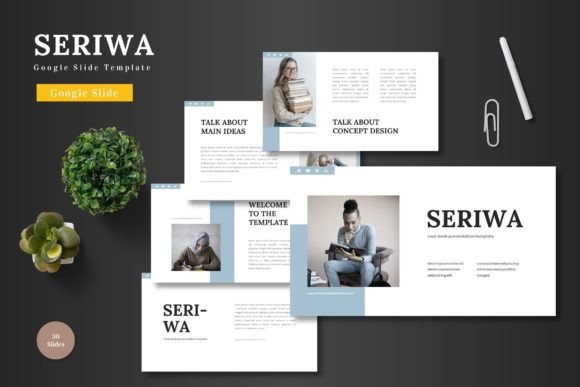
The Seriwa Google Slides Template is essentially a pre-designed set of slides built on a consistent visual theme. Its stated purpose is broad, targeting business presentations, pitch decks, e-commerce showcases, and product promotions. This multipurpose claim is anchored in its structure: 150 total slides distributed across five distinct color schemes, yielding 30 slides per color variation. This volume and variety provide a significant library of layouts, from introductory slides and section breaks to detailed infographics and portfolio galleries.
The key characteristic of the Seriwa template is its commitment to in-platform editing. All elements are crafted using native Google Slides shapes and features. This means users can edit, resize, change colors, and input content without requiring external software like Adobe Illustrator or PowerPoint for modifications. The template includes picture placeholders, enabling drag-and-drop image replacement, which is a practical feature for rapid content assembly.
Key Strengths and Practical Value
The immediate strength of this template package is its scalability. With 150 slides across five colors, a user can develop a lengthy, chaptered report or a concise, single-topic pitch without needing to design new page formats from scratch. The inclusion of handcrafted infographics, pixel-perfect illustrations, and resizable graphics addresses a common pain point: integrating professional-looking data visualization without specialized design skills.
Usability is a central pillar. By operating entirely within Google Slides, it removes friction from the workflow. Professionals who rely on the cloud-based collaboration and accessibility of Google Workspace will find this alignment particularly valuable. Changing a color scheme across an entire presentation can be a tedious manual task; having five pre-coordinated color variations built on master slide principles promises consistency and saves considerable time.
The mention of an animated slide indicates attention to dynamic presentation techniques, offering a ready-made element to enhance engagement during a live presentation. Furthermore, the inclusion of portfolio and gallery slides speaks directly to the needs of creatives, marketers, and e-commerce users who need to showcase visual products or project outcomes effectively.
Considering Quality and Consistency
A template's long-term value hinges on the underlying quality of its design and construction. The Seriwa template’s claims of being “clean, scalable, colorful” and based on master slides suggest a focus on foundational design principles. Master slide usage is critical; it ensures that global changes to fonts, colors, or backgrounds propagate throughout the presentation, maintaining visual integrity. For a business user, this reliability is non-trivial—it ensures brand colors and typography are applied consistently across every slide, reinforcing professional credibility.
The provided main files are five PPTX files for a widescreen format, alongside a readme file containing font and photo information. This indicates the template is also distributed in PowerPoint format, which may assist users who need to finalize or present in that environment, though the core proposition remains its Google Slides-native editing.
Audience Fit and Ideal Use Cases
The Seriwa Google Slides Template is not a niche product. Its broad applicability makes it suitable for several key audiences. Entrepreneurs and small business owners developing investor pitch decks or internal strategy presentations will benefit from the structured layouts and professional aesthetics. Marketers and e-commerce professionals can leverage the product-focused slides and gallery layouts for campaign reviews or product launch presentations.
Freelancers, creators, and bloggers who need to present their services, portfolio work, or content strategies to clients will find the portfolio sections particularly useful. Educators and publishers creating instructional materials or conference presentations can utilize the varied layout library to organize information hierarchically. Even serious hobbyists leading club presentations or community talks could use this template to elevate their visual delivery without investing in custom design.
The template is less likely to be the ideal fit for organizations with a strict, proprietary corporate template that cannot be deviated from, or for designers seeking highly avant-garde, unconventional visual themes. Its value is in providing a robust, professional, and editable starting point for those who need to produce quality presentations efficiently.
Potential Limitations and Professional Observations
While the feature set is substantial, practical performance depends on execution. The term “pixel-perfect illustrations” suggests high graphic quality, but the actual resolution and adaptability of these graphics when scaled extensively should be tested by the user. The reliance on Google Slides' sometimes limited graphic manipulation tools compared to dedicated design software means that while editing is convenient, it may not allow for extremely intricate custom modifications beyond the template’s intended framework.
Another consideration is the potential for homogeneity. With many users accessing the same popular templates, there is a risk presentations can feel generic if not sufficiently personalized. The true test of the Seriwa template will be how easily users can imbue it with their unique content and brand personality, moving beyond a standard template look. The five color variations help mitigate this, offering different emotional tones from the outset.
Making an Informed Decision
Deciding if the Seriwa Google Slides Template fits your needs involves aligning its offerings with your specific requirements. Evaluate your typical presentation length, the need for data visualization, and the importance of a cohesive color scheme. If your workflow is deeply embedded in Google Slides and you prioritize collaborative editing and cloud access, this template’s native design is a significant advantage.
Consider your design proficiency. If you possess advanced skills and enjoy building every slide from scratch, a template may offer less value. However, if you seek to delegate the foundational design work to a reliable system so you can focus on content and messaging, the Seriwa template presents a compelling option. Its multipurpose nature means it can serve as a versatile asset for diverse projects over time, offering long-term value as a reusable resource in your toolkit.
Ultimately, the Seriwa - Google Slide Template is a substantial resource designed to reduce the overhead of presentation design. By providing a wide array of editable, professionally styled slides directly within a familiar platform, it enables users to concentrate on what matters most: delivering their content with clarity, confidence, and visual impact.