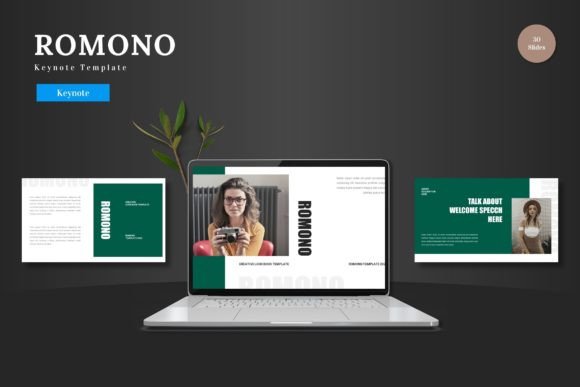
Romono Keynote Template: A Process-Driven Design Resource for Modern Presentations
In the workflow of creating a presentation, the design phase often becomes a bottleneck. You have your content, your data, and your narrative, but translating that into a visually cohesive slide deck can consume disproportionate time and effort. The Romono Keynote Template enters this process not as a mere decorative tool, but as a structured design system. It is a comprehensive template designed to integrate directly into the preparation and execution stages of building a keynote, business pitch, educational lecture, or portfolio showcase. Its value lies in how it standardizes the visual layer, allowing the creator to focus energy on refining the message and delivery.
Integrating Romono into Your Presentation Development Workflow
A typical presentation workflow involves research, content drafting, storyboarding, design implementation, and rehearsal. Romono fits primarily into the design implementation stage, but its influence begins earlier. During storyboarding, knowing you have a template with 150 total slides, organized across 5 premade colors and specific sections, allows you to plan your visual narrative with confidence. You can allocate certain slide types—like the portfolio slides or section break slides—to specific parts of your talk during the content drafting phase, creating a more seamless transition from outline to final deck.
For professionals and entrepreneurs, this integration saves critical time. Instead of designing each slide from a blank canvas, you begin with a professionally crafted foundation. The process shifts from "how should this slide look" to "which of the available, coherent layouts best conveys this point." This is particularly valuable when working under tight deadlines or when consistency across multiple presentations for the same brand or project is required.
Preparation and Foundation: The Master Slide System
The core of the Romono Keynote Template’s efficiency is its structure based on master slides. Master slides are the backbone templates within Keynote that define global styles for backgrounds, text placements, and color schemes. Romono’s handcrafted infographics and pixel-perfect illustrations are built into this system. In practice, this means that when you apply a color variation or change a font on a master slide, the change propagates throughout the entire deck, maintaining visual harmony without manual adjustment on each slide. This directly addresses quality control and consistency, which are often pain points in collaborative projects or when last-minute edits are needed.
Preparation with Romono involves a simple but crucial step: reviewing the included readme file and understanding the five color schemes. Choosing a color scheme at the outset aligns your presentation with your brand palette or thematic needs and sets the direction for all subsequent work. This decision, made early in the process, eliminates the later scramble of trying to recolor dozens of individual elements.
Practical Implementation: Customization and Content Population
The promise of customization is often overstated in templates. Romono’s design, however, focuses on editable and resizable graphics and easy-to-use picture placeholders. The implementation tip here is straightforward: use the drag-and-drop gallery and portfolio slides as your content buckets. For a marketer presenting a campaign case study, you can drag client logos into the placeholder areas on the infographic slides. For an educator, you can populate the gallery slides with diagrams or photographs relevant to the lecture topic. The process is intentionally tactile and direct within Keynote, avoiding the need to exit into complex graphic software.
Another practical consideration is organization. The template is divided into 30 slides for each of its template sections. In your workflow, you might not use all 150 slides. A useful approach is to duplicate the Keynote file, rename it for your specific project, and then delete slides or sections you won't need, creating a lean, project-specific deck. This keeps your working file organized and prevents scrolling through irrelevant slides during editing or rehearsal.
Interacting with Other Tools and Assets
Romono does not exist in isolation. It interacts with your existing assets—your company logo, your product photographs, your data charts. Its picture placeholder system and editable infographics are designed to receive these assets cleanly. For users who also work in other platforms, such as data visualization tools or photo editing software, the output from those tools can be brought directly into Romono’s structured slides. The template ensures that externally created assets sit within a professional visual framework, elevating their presentation.
Compatibility is a key factor for long-term use. As a native Keynote template (the main file includes 5 KEY item from Keynote), it operates seamlessly within Apple’s ecosystem. For users who sometimes need to present on Windows systems, careful exporting to PDF or PowerPoint from Keynote is part of the post-design workflow. The template’s clean, vector-based illustrations typically translate well during such exports, maintaining the quality of your visual investment.
Use Cases Across Professional and Creative Roles
The application of Romono varies naturally by role, but its process-oriented design supports a wide range of objectives.
- Entrepreneurs and Small Business Owners: Use it during the business planning and funding pitch process. The cohesive design across 30 slides for each color scheme provides a professional backbone that startups often lack. The process involves populating the financial infographics with your numbers and using the portfolio slides to showcase early product designs.
- Educators and Trainers: Integrate Romono into the curriculum development workflow. Before a semester or a workshop, you can build the lecture deck using the section break slides to clearly denote topics or breaks. The ability to effortlessly match colors to your institution’s branding adds a layer of formal credibility.
- Freelancers and Creators: For presenting client work, such as design portfolios or project proposals, Romono serves as the consistent wrapper for your varied creative assets. The workflow involves dropping your best work into the gallery slides and using the master slides to ensure every client proposal looks polished and unified, saving time on repetitive design tasks.
- Bloggers and Publishers: When transforming written content into a visual presentation for a conference or a webinar, Romono provides a structured path. The process is one of adaptation: taking key article points and assigning them to the template’s text and illustration slides, creating a companion piece to your written work with minimal design overhead.
Long-Term Use and Efficiency Gains
A key observation about using a robust template like Romono is the compounding benefit over time. For a user who delivers multiple presentations a year, having a trusted, adaptable template becomes a core asset. You develop familiarity with its layouts, knowing exactly which slide to use for a competitor comparison or a timeline. This familiarity speeds up the creation process for each new project. Furthermore, by sticking with one well-designed system, you build a recognizable visual identity across all your communications, an often overlooked aspect of professional consistency.
Usability extends to collaboration. If you work within a team, sharing the Romono Keynote Template file ensures everyone produces slides that look like they came from the same source. This is vital for departments where multiple people contribute to a single company presentation, eliminating the jarring visual discrepancies that can undermine a unified message.
Moving from Template to Delivery
The final stage of the presentation workflow is rehearsal and delivery. Romono impacts this stage indirectly but importantly. A well-designed, visually engaging deck that you didn’t have to struggle to create boosts confidence. The section break slides and clear visual hierarchy help you, as the presenter, navigate your talk more smoothly. The audience’s experience is also enhanced; a cohesive visual journey supports comprehension and retention of your message, making the template an active contributor to your presentation’s success.
Ultimately, the Romono Keynote Template is a process tool. It is designed for integration into the practical, often time-pressured workflow of creating a significant presentation. By handling the foundational design work, it allows the creator to focus on the higher-order tasks of message refinement, storytelling, and engaging delivery. Its features—from the 5 color variations to the resizable graphics—are not just a list of specs but a set of facilitators for a more efficient and effective implementation from idea to delivered keynote.