Werocas: Your Shortcut to Professional Google Slides Presentations
Crafting a presentation that is both visually compelling and clearly structured is a common challenge. Whether you are pitching to clients, reporting to stakeholders, or teaching a class, your slides need to communicate authority and clarity. The process of designing from a blank canvas, however, can be time-consuming and often leads to inconsistent visuals or a layout that fails to engage. This is where a well-designed template becomes a crucial tool, transforming a daunting task into a streamlined creative process.
The Presentation Dilemma: Time, Consistency, and Impact
Many professionals face a trio of core challenges when building presentations. First is the significant time investment required to design each slide individually, aligning elements and ensuring a coherent look. Second is maintaining visual consistency across all slides, from title pages to data charts, which is essential for professional credibility. Third, and perhaps most important, is creating genuine impact. A presentation must not only inform but also persuade and captivate its audience. Without a strong visual foundation, even excellent content can lose its power.
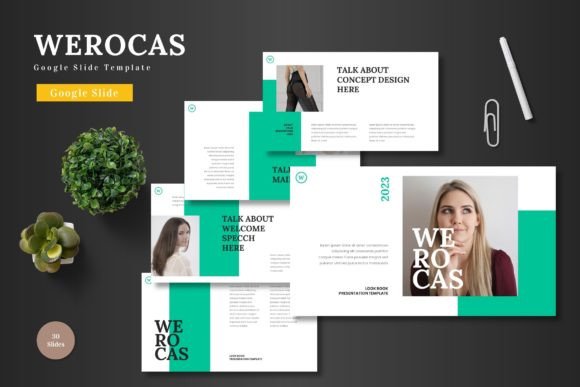
Enter the Werocas - Google Slide Template. This is not merely a set of blank slides with a background color. It is a comprehensive design system built specifically for Google Slides, offering a complete framework for your content. The Werocas template provides a structured starting point with professionally arranged layouts for text, images, and data, allowing you to focus entirely on your message rather than the mechanics of design.
How Werocas Addresses Core Presentation Needs
The Werocas - Google Slide Template functions as a solution by tackling those fundamental challenges head-on. Its primary benefit is efficiency. With 150 total slides pre-organized across 5 distinct color schemes, you have an extensive library of ready-to-use layouts. Instead of building slides, you select and customize. This drastically reduces production time, enabling you to develop a full presentation in a fraction of the usual time.
For consistency, the template is built on a system of master slides and pixel-perfect illustrations. This means every element adheres to a unified design language. When you use the Werocas template, your title slides, section breaks, infographics, and portfolio pages will all feel part of a single, polished document. This cohesive look automatically elevates the perceived quality of your work.
Regarding impact, the template’s strengths are its handcrafted infographics and thoughtful arrangements. Visualizing data or processes with clear, editable graphics helps audiences understand and retain information more effectively. The included picture placeholder and drag-and-drop gallery slides make it simple to incorporate high-quality imagery, which is key to emotional engagement and storytelling.
Practical Applications and Outcomes
Using the Werocas - Google Slide Template leads to tangible outcomes across various scenarios. A marketing manager can quickly assemble a compelling product launch deck, using the portfolio slides to showcase features and the infographics to highlight market data. A team leader can create a quarterly review presentation that is clear, data-rich, and visually unified, fostering better stakeholder understanding. An educator can design lecture materials that are engaging and easy to follow, using the structured sections and resizable graphics to break down complex topics.
The outcome is consistently a professional-grade presentation that you own. Because the Werocas template is fully editable, you are not locked into a generic look. You can modify colors, resize all graphics, and rearrange elements to suit your brand or personal style. The final product is uniquely yours, but achieved with a foundation of professional design principles.
Tailoring Werocas to Different User Approaches
The flexibility of the Werocas - Google Slide Template allows it to serve users with different skill levels and objectives. For the design-conscious user who enjoys customization, the package provides deep control. With 5 separate PPTX files and 30 slides per color scheme in Google Slides format, you can mix and match, tweak illustrations, and experiment with the five color variations to create a truly custom aesthetic.
For the user who prioritizes speed and simplicity, the Werocas template is a plug-and-play solution. You can choose a color scheme that matches your brand, then simply drag your text and images into the pre-formatted placeholders. The section break slides and pre-arranged layouts mean you don’t need to think about flow or hierarchy—it’s already thoughtfully designed.
For teams, the template ensures brand consistency. By using the same Werocas template foundation, different team members can create presentations that all look part of the same family, strengthening corporate identity and communication standards.
Recommendations and Useful Considerations
When starting with the Werocas - Google Slide Template, first review the included “Readme First” file for essential instructions on fonts and photo resources. Then, browse through the five color schemes to select one that best aligns with your topic or brand mood. Begin your work by utilizing the master slide structures to establish your core fonts and colors globally, ensuring consistency from the start.
Make the infographics a key part of your narrative. Use them to replace paragraphs of text when explaining processes, statistics, or hierarchies. Remember that all graphics are resizable and editable, so you can adapt them perfectly to your specific data. For maximum impact, leverage the dedicated gallery slides for visual storytelling—a series of well-curated images can often convey more than bullet points.
Consider the Werocas template not as a one-time tool, but as a reusable resource for your organization. Its comprehensive nature means you can return to it for various projects, always starting from a point of strength rather than a blank page. This repeated use builds your proficiency and further accelerates your presentation development process.
Focusing on Implementation and Usefulness
Ultimately, the value of the Werocas - Google Slide Template lies in its implementation. It shifts your focus from “how should this slide look?” to “what does this slide need to say?” By removing the design overhead, it empowers you to concentrate on your core content, your argument, and your audience’s needs. The result is presentations that are not only faster to produce but also more effective in delivery.
In a world where clear communication is paramount, having a reliable, professional, and adaptable tool like the Werocas template is a significant advantage. It addresses the practical needs of time, consistency, and impact, providing a direct path from your ideas to a visually appealing presentation that effectively conveys them. Whether you are a seasoned presenter or someone who dreads slide design, this template offers a helpful, solution-focused framework to improve your work and communicate your ideas with confidence.