Dupiliz Google Slide Template: A Practical Evaluation
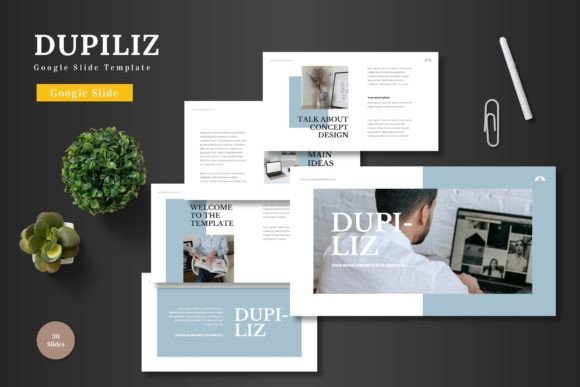
In the realm of professional communication, the quality of a presentation can significantly influence outcomes. Whether pitching to investors, training a team, or promoting a new product, the visual framework you use is a critical component. The Dupiliz Google Slide Template presents itself as a ready-made solution for these scenarios. It is not merely a collection of slides, but a structured design system built within Google Slides, intended to provide a clean, scalable, and multipurpose foundation for a wide variety of presentation needs.
What makes the Dupiliz template worth a detailed look is its inherent practicality. It operates entirely within the Google Slides ecosystem, eliminating the need for additional software. This is a key characteristic that aligns with modern workflows where ease of access and collaborative editing are paramount. The promise is a template that is both aesthetically prepared and functionally flexible, allowing users to input content, replace images via placeholder mechanics, and adjust colors without departing from a familiar interface.
Core Characteristics and Structural Design
The Dupiliz template is built around a foundation of 150 total slides, distributed across five distinct premade color schemes. This structure offers 30 slides for each color variation, providing a substantial starting library. The inclusion of section break slides aids in organizing longer presentations into logical segments. A notable feature is the provision of handcrafted infographics, which are reportedly created in PowerPoint but integrated for use within Google Slides. This suggests a focus on detailed, custom graphic elements rather than generic clipart.
The design is based on master slides, which is a professional approach ensuring consistency across the entire presentation. When you modify a master element, such as a footer font or a background color scheme, the change propagates throughout all slides derived from that master. This is a significant strength for maintaining visual coherence, especially in lengthy or complex decks. Pixel-perfect illustrations and resizable, editable graphics further contribute to a polished final product. The inclusion of dedicated gallery and portfolio slides, along with picture placeholder functionality, indicates thoughtful preparation for common business use cases like showcasing products or team members.
Usability and Editing Experience
The practical value of the Dupiliz Google Slide Template hinges on its usability. The claim that all elements are editable directly within Google Slides is central. In real-world use, this means a marketing manager can update a quarterly report without switching applications, or an educator can tailor a lecture deck during a lunch break. The drag-and-drop functionality for images, if implemented effectively, streamlines the most common editing task. Changing colors across an entire theme, facilitated by the five provided color schemes, allows for quick brand alignment.
However, the performance of such a feature-rich template depends on the user’s familiarity with Google Slides’ own capabilities. While the template provides the structure, effective editing still requires a basic understanding of how to use placeholders, modify text boxes, and manipulate shapes. For professionals already comfortable with the platform, the Dupiliz template likely serves as a powerful accelerator. For absolute beginners, there may be a learning curve associated with leveraging the master slide features and infographic elements to their full potential.
Target Audience and Situational Fit
This template’s multipurpose nature makes it suitable for a broad spectrum of users. Professionals crafting business reports, entrepreneurs developing pitch decks for startups, and e-commerce managers preparing product launch presentations are clear beneficiaries. The clean and colorful design is versatile enough for internal meetings as well as external client-facing events.
Creators, freelancers, and bloggers might find value in using Dupiliz for presenting their services, portfolio work, or content strategies. Educators and small business owners, who often need to communicate complex information clearly but lack dedicated design resources, could gain significant efficiency. Even serious hobbyists presenting at community events or workshops would benefit from a structured, professional-looking template. The key situational fit is any scenario where time is limited, visual consistency is important, and the presentation must be developed and potentially collaborated on within the Google workspace.
Quality Considerations and Long-term Value
Evaluating the quality of a digital template involves assessing its design integrity, flexibility, and reliability. The mention of pixel-perfect illustrations and handcrafted infographics points to an attention to detail that avoids the blurry, stretched graphics common in lower-quality templates. A design based on master slides promotes long-term value; once a user customizes the master to their brand (colors, fonts, logo placement), they can generate countless future presentations from the same template, ensuring brand consistency over time.
The inclusion of animated slides adds a layer of dynamic presentation potential, which can enhance engagement during live delivery. The main file includes five separate PPTX files for a widescreen format, each representing a color scheme. This provides a fallback option for users who might need to work in PowerPoint occasionally, though the core value is tied to Google Slides. The provided documentation on fonts and photo information is a practical touch that aids in proper usage and attribution, supporting a professional workflow.
Potential Limitations and Balanced Observations
No tool is universally perfect for every need. A possible limitation of the Dupiliz Google Slide Template is its defined structure. While flexible within its framework, users seeking highly unconventional, avant-garde presentation styles might find it too standardized. The five color variations are a starting point, but creating a completely custom color palette beyond these might require more advanced editing.
Furthermore, the effectiveness of the template is ultimately dependent on the content it holds. A superb design cannot compensate for weak data or unclear messaging. The template serves as a vessel. Its value is in saving time on design, reducing aesthetic anxiety, and providing a credible visual stage for the user’s own ideas and information. For teams that strictly use Microsoft PowerPoint and do not utilize Google Workspace, the primary Google Slides integration might not be advantageous, despite the included PPTX files.
In conclusion, the Dupiliz Google Slide Template appears to be a robust, thoughtfully constructed resource. Its strengths lie in its volume of slides, design consistency through master slides, and dedicated features for business and promotional purposes. It fits seamlessly into a Google-centric workflow, offering scalability and editability without external software. For the target audience of professionals, entrepreneurs, and creators who regularly need to produce clear, visually appealing presentations under time constraints, it represents a practical and valuable asset. Before adoption, users should consider their specific design needs and their comfort level with the Google Slides platform to ensure it aligns with their process and project goals.