Elevate Your Message with Trimuca Google Slide Templates
In the world of presentations, the gap between a basic slide deck and a compelling visual story is often vast. For creators, educators, and entrepreneurs, the challenge isn't just having information to share—it’s packaging that information in a way that captures attention, enhances understanding, and leaves a lasting impression. This is where specialized tools like the Trimuca - Google Slide Template become invaluable. It’s not merely a set of slides; it’s a structured design system built to accelerate your creative process while ensuring professional polish.
A Foundation Designed for Versatility
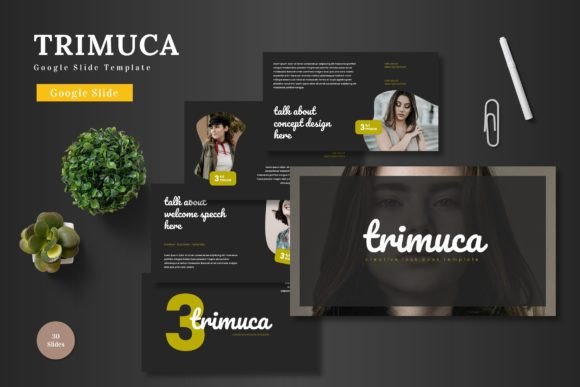
The core offering of Trimuca is a robust library of 150 total slides, thoughtfully distributed across 5 premade color schemes. This means you receive 30 meticulously crafted slides for each color variation, providing a cohesive visual language from the first slide to the last. The template is built on master slides and features pixel-perfect illustrations, guaranteeing that every element aligns perfectly. More importantly, every graphic is resizable and editable, and picture placeholders use a simple drag-and-drop functionality. This combination of rigorous structure and flexible components means you start with a professional baseline but retain complete creative control to adapt every detail.
Included in the main file are 5 PPTX files and the equivalent Google Slides formats, along with a clear readme file containing font and photo information. This practical consideration ensures you can dive into customization without technical guesswork, whether your preferred platform is PowerPoint or Google Slides.
Unlocking Creative Applications
The true value of a template like Trimuca lies in how it can be interpreted and applied across countless scenarios. Its clean, infographic-based design and section break slides make it inherently suited for organizing complex information. But its utility stretches far beyond traditional business reports.
For Marketers and Entrepreneurs
Consider using Trimuca to craft a stunning investor pitch deck. The handcrafted infographics can powerfully illustrate market data, growth trajectories, or financial projections. The five color variations allow you to tailor the deck’s emotion—perhaps using a bold, energetic scheme for a tech startup, or a more subdued, trustworthy palette for a service-based business. The gallery and portfolio slides are perfect for showcasing product images, client case studies, or a timeline of company milestones.
For Educators and Trainers
Transform dry curriculum or training material into engaging learning experiences. The template’s clear hierarchy and visual aids can break down intricate subjects into digestible modules. An educator might use one color scheme per module to visually segment a course, while a corporate trainer could adapt the illustrations to explain new software processes or safety protocols. The resizable graphics mean you can easily incorporate diagrams, flowcharts, or custom icons relevant to your specific topic.
For Creators and Freelancers
This template serves as an excellent portfolio presentation. Use it to present your service offerings, highlight past projects with the portfolio slides, and structure your client onboarding process. Bloggers and publishers can adapt slides to create visual summaries of long-form articles or plan content strategies visually. The ease of modifying colors ensures the presentation always aligns with your personal or brand identity.
Adapting for Different Audiences and Goals
A key principle of effective communication is audience alignment. The adaptable nature of Trimuca facilitates this. For a formal boardroom audience, you might stick closely to one of the more conservative color schemes, use data-centric infographics, and keep transitions minimal for a serious, authoritative tone. For a creative workshop or a presentation to potential collaborators, you could mix color schemes between sections to maintain energy, leverage the more illustrative slides, and use transitions to create a sense of narrative flow.
The template also supports adaptation for different formats. The individual slides can be exported as high-quality images for use in social media carousels or blog posts. The structured layout makes it suitable for creating printable handouts or seminar guides. By thinking of the slides not just as a linear presentation but as a repository of visual components, you extend its utility.
Practical Guidance for Maintaining Clarity and Originality
While templates provide a jumpstart, the final outcome’s effectiveness hinges on your application. Here are some grounded recommendations:
- Consistency is Key: Choose one color variation as your primary foundation. Use the other schemes sparingly, perhaps only for section breaks or to highlight a key call-to-action slide, to maintain a cohesive look.
- Edit with Purpose: The resizable, editable graphics are a gift. Don’t just change colors randomly. Align your edits with your message. If your brand color is blue, modify accent elements to that blue. Replace placeholder images with high-quality, relevant photographs that directly support your text.
- Prioritize Content Hierarchy: The template provides structure, but you must fill it with clear hierarchy. Use the provided text layouts to ensure your headlines are prominent, your body text is scannable, and bullet points are concise. Never let design overwhelm the message.
- Infographics Tell Stories: Don’t use an infographic slide just because it looks good. Match the infographic style to the data. Use a process flowchart for a step-by-step explanation, a timeline for historical data, or a comparison chart for evaluating options.
The goal is to use the Trimuca - Google Slide Template as a collaborative partner in your design process. It handles the foundational design rules and heavy lifting, freeing you to focus on the strategic part of your presentation: crafting a narrative, choosing the most impactful data, and tailoring the experience to your audience’s needs.
A Tool for Empowered Communication
Ultimately, tools like Trimuca democratize high-quality design. They enable a small business owner to present with the same visual authority as a large corporation, allow a teacher to create materials that rival professional educational resources, and help a freelancer present their work with compelling polish. The template invites you to be a storyteller, an educator, or a strategist, removing the technical barrier of building a visual framework from scratch.
By starting with a system that is both comprehensive and adaptable, you channel your energy into what matters most—the ideas you’re conveying and the people you’re addressing. Whether your project is a client proposal, a university lecture, a product launch, or an internal strategy review, having a robust, editable, and visually coherent foundation is the first step toward making your message not just heard, but remembered and understood.