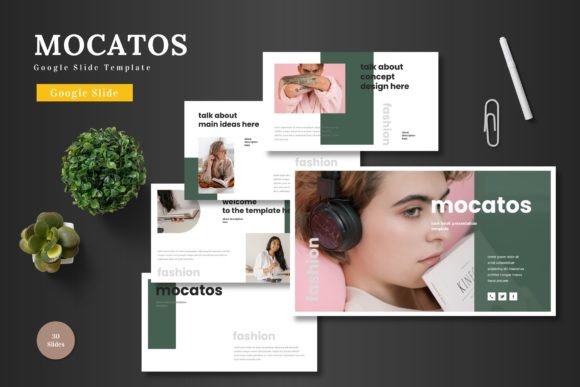
Mocatos Google Slide Template: Streamlining Modern Presentations
In a world where communication is increasingly visual and digital, the pressure to deliver crisp, engaging presentations has never been higher. For professionals, entrepreneurs, educators, and creatives, the slide deck is often the centerpiece of a pitch, a lesson, a product launch, or an internal review. Yet, the process of crafting one—from a blank canvas—can be a significant drain on time and creative energy. This is where a purpose-built template like Mocatos - Google Slide Template transforms the workflow, offering not just a design shortcut but a foundation for quality and consistency.
The Shift Towards Ready-to-Use Design Solutions
The expectation for polished, professional visuals is now standard across almost all fields. What was once acceptable as a simple, text-heavy document is now perceived as a lack of effort or professionalism. Concurrently, modern workflows demand agility. Teams and individuals need to iterate quickly, adapt content for different audiences, and maintain a cohesive brand identity without constant designer intervention. Google Slides itself has risen as a key platform in this shift, prized for its collaboration features, cloud accessibility, and zero-cost entry point. However, its default offerings often leave users wanting more sophisticated design options.
Mocatos - Google Slide Template directly addresses this gap. It is a comprehensive, multipurpose template designed to be ready to use within the Google Slides environment. Its relevance stems from aligning with core contemporary needs: efficiency without sacrificing quality, scalability for various purposes, and total editability without requiring additional software. The template empowers users to bypass the daunting initial design phase and focus immediately on their core message and content.
What Makes Mocatos a Practical Toolkit
Understanding the Mocatos Google Slide Template begins with recognizing it as a structured design system, not merely a collection of slides. The package includes 150 total slides, intelligently organized into 5 premade color schemes, with 30 slides dedicated to each variant. This structure provides immense flexibility. Whether creating a business pitch deck that requires a corporate blue theme or an e-commerce promotion that pops with vibrant colors, the foundational layout and assets remain consistent, allowing for easy theme switching.
Key practical features define its utility:
- Handcrafted Infographics & Pixel-Perfect Illustrations: These are not generic clip art. They are custom-designed visual assets that help translate complex data or processes into clear, engaging graphics, enhancing comprehension and retention for your audience.
- All Graphics Resizable and Editable: Every element, from icons to chart components, can be modified directly within Google Slides. You can change colors, adjust sizes, or rearrange components to perfectly fit your narrative.
- Drag-and-Drop Picture Placeholders: This feature simplifies the often tedious process of image insertion. Simply drag your photo into the placeholder, and it adapts to the framed design, maintaining layout integrity effortlessly.
- Dedicated Gallery and Portfolio Slides: For product promotions, creative showcases, or case study presentations, these pre-formatted slides provide elegant frameworks to highlight visual content.
- Animated Slides: Included animations offer a layer of dynamism to your presentation, helping to guide viewer focus and introduce content in a sequenced, professional manner, all without needing advanced animation skills.
Evolution of Presentation Tools and User Expectations
The landscape has evolved from static PowerPoint files emailed as attachments to live, collaborative documents presented remotely or in hybrid settings. Audiences are more discerning, influenced by the high-quality visual storytelling they consume daily on digital platforms. A presentation must now compete for attention while conveying authority and clarity. Templates like Mocatos represent the maturation of presentation aids, evolving from basic theme packs to comprehensive, master-slide-based systems.
People are paying more attention to such templates because the value proposition is clear: maintaining the quality of your products or ideas through superior visual communication. For a freelancer, it means presenting a client proposal that looks premium, reinforcing their expertise. For a small business owner, it means creating a pitch deck that stands alongside those of larger competitors. For an educator, it means designing lessons that are visually organized and engaging for students. The template acts as a quality-control mechanism, ensuring a baseline of professional design that users might not achieve starting from scratch.
Direct Implications for Users and Creators
The practical implications of utilizing a robust template like Mocatos are multifaceted. Firstly, it drastically reduces time-to-presentation. Inputting your content, replacing images into placeholders, and changing colors can be done in a focused editing session, as all elements are editable directly on Google Slides. This efficiency frees up resources for refining the message itself—the research, the narrative flow, and the rehearsal.
Secondly, it ensures visual consistency. Using the master slides and predefined layouts guarantees that fonts, spacing, color palettes, and graphic styles remain uniform throughout the entire deck, which is critical for brand cohesion and professional credibility. Thirdly, it lowers the technical barrier. Users no longer need to be proficient in graphic design software or advanced slide animation tools. The complex design work is pre-built, yet fully adaptable, putting creative control back into the hands of the content expert.
For example, a startup founder using Mocatos can quickly assemble a investor pitch deck by selecting the appropriate color scheme, utilizing the infographic slides to explain their business model, employing the portfolio slides to showcase their product mockups, and leveraging the animated transitions to build a compelling narrative arc. All this is achieved while ensuring every slide feels part of a single, polished package.
Integrating Mocatos into Diverse Professional Needs
The multipurpose nature of the Mocatos Google Slide Template is one of its strongest attributes. Its suitability for business, pitch decks, e-commerce, or product promotion speaks to a design philosophy centered on versatility. The template sections and break slides provide logical structuring for any long-form presentation.
For marketers and bloggers, it can serve as a framework for webinar slides or content reports. For business owners, it’s a tool for quarterly reviews, strategy presentations, or new service launches. The included 5 PPTX files from Google Slides and the detailed folder structure with readme, font, and photo information further support a smooth onboarding process, making it accessible even for those less familiar with digital asset management.
The forward-looking aspect here is not about predicting a revolution, but observing a steady normalization. High-quality, editable templates are becoming essential tools in the professional toolkit, much like CRM software or project management apps. They acknowledge that while content is king, its presentation is the throne. Mocatos, by being clean, scalable, colorful, and entirely operable within a free, collaborative platform like Google Slides, positions itself as a realistic and highly useful solution for this ongoing need.
Ultimately, the Mocatos Google Slide Template represents more than just slides; it is a designed environment for effective communication. It meets the modern mandate for speed and polish, adapts to the varied needs of today’s professionals and creators, and leverages the ubiquitous platform of Google Slides to deliver that utility directly into the user’s workflow. By starting with such a foundation, users can channel their energy into what matters most: crafting and delivering a message that resonates, backed by visuals that empower it.