Elevate Your Presentations with Pocasa Powerpoint Template
Every impactful presentation begins not with words, but with a foundation. That foundation is the visual framework that guides your audience, amplifies your message, and ultimately determines whether your ideas resonate or simply fade into the background. For professionals, educators, and creators who understand this, a powerful template is more than a decorative tool; it’s a strategic asset. The Pocasa Powerpoint Template offers exactly that: a meticulously crafted system designed to transform complex data and abstract concepts into compelling, clear, and visually stunning narratives.
Beyond Basic Slides: A Designed System for Communication
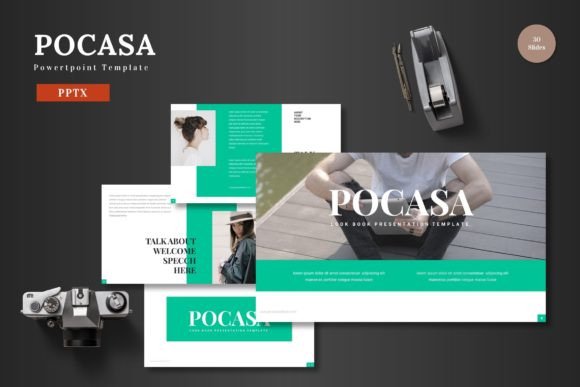
What distinguishes the Pocasa Powerpoint Template from a simple collection of slides is its holistic approach. It provides 150 total slides distributed across five distinct premade color schemes, giving you not just variety but a coherent palette to choose from for any project. This isn't about randomly picking a slide. It’s about selecting a complete visual language—whether you need the calm authority of a deep blue, the energetic vibe of a bright scheme, or the professional neutrality of a monochrome set. Each color variation contains 30 thoughtfully structured slides, ensuring consistency throughout your presentation.
The true power lies in the underlying architecture: master slides. These master layouts ensure that every element you add—text, images, infographics—adheres to a unified design principle. This creates a pixel-perfect, professional look that is notoriously difficult to achieve when piecing together slides from disparate sources. For the user, this means efficiency. You spend your time on content and narrative flow, not on aligning boxes or correcting font sizes.
Key Features That Empower Your Process
Let’s examine what makes this template a practical tool for daily use:
- Handcrafted Infographics: Data storytelling is central to modern presentations. Pocasa includes custom infographic slides designed to present statistics, processes, and comparisons in an immediately understandable format. These are not generic clip-art; they are built to integrate seamlessly with the template’s overall aesthetic.
- Fully Editable Graphics: Every icon, illustration, and graphic element is resizable and editable. You can change colors, adjust sizes, and even break apart elements to suit your specific need without losing quality or leaving the cohesive design environment.
- Intuitive Placeholders: Drag-and-drop picture placeholder sections and dedicated gallery/portfolio slides simplify the inclusion of visual media. This is particularly valuable for marketers showcasing products, artists presenting portfolios, or educators integrating multimedia examples.
- Structural Guidance: The inclusion of section break slides helps you organize your presentation into clear chapters. This aids audience comprehension and gives you, the presenter, a natural pacing tool.
Real-World Applications Across Fields
The versatility of the Pocasa Powerpoint Template stems from its balanced design—it is polished enough for corporate boardrooms yet dynamic enough for creative pitches. Consider a freelance designer using the portfolio slides to present recent work to a potential client, with every image sitting perfectly within the layout. An entrepreneur might utilize the infographics to clearly present market analysis and growth projections to investors, making complex data accessible. An educator could employ the structured sections and clear visuals to build a lecture that maintains student engagement from start to finish.
In a business environment, consistency equals credibility. Using a template like Pocasa ensures that every internal report, client proposal, or conference talk from your team carries a uniform, professional brand identity. The five color schemes allow for differentiation between departments or project types while maintaining a familial design thread. For bloggers and content publishers repurposing presentation content for social media or websites, the high-quality, editable graphics provide ready-made assets for other digital channels.
The Tangible Benefits: Time, Clarity, and Impact
Adopting a robust template translates into concrete benefits. First is a significant reduction in production time. The struggle of building a visually coherent deck from a blank slate is eliminated. You start from a position of strength, allowing you to focus on refining your message and rehearsing your delivery, not on design struggles.
Second, it enhances communicative clarity. Good design is not just decoration; it is a form of cognitive support. Well-organized information hierarchies, thoughtful color usage, and appropriate visual cues help your audience follow your logic and retain key points. The Pocasa Powerpoint Template is engineered with these principles in mind.
Finally, it amplifies professional impact. A sleek, well-designed presentation signals preparedness and respect for your audience. It builds subconscious trust and authority, making your ideas more persuasive. In a world saturated with mediocre slides, standing out visually can be the difference between being heard and being overlooked.
Practical Considerations for Implementation
When evaluating any presentation template, consider your actual workflow. The Pocasa Powerpoint Template includes the main file in PPTX format, ready for use in PowerPoint. The bundled readme file, font information, and photo details are crucial for proper setup. Before diving in, review these to ensure you have the necessary fonts installed for perfect typographic rendering.
Start by browsing the five color schemes and selecting one that aligns with your topic's tone or your organization's branding. Then, explore the master slides to understand the core layouts. This will help you modify elements globally if needed. Use the section breaks to map out your presentation’s narrative arc before filling in content. Leverage the editable infographics by tailoring them to your specific data—this customization is where the template truly becomes your own.
Remember, a template is a starting point, not a constraint. The flexibility built into the Pocasa Powerpoint Template encourages adaptation. Change colors within a scheme, resize graphics to highlight certain elements, and use the placeholder areas to incorporate your unique visuals. The goal is to merge the template’s professional structure with your individual content and personality, creating a final presentation that is both polished and authentically yours.
In essence, the Pocasa Powerpoint Template provides the design confidence that allows you to focus on what matters most: sharing your ideas with clarity and impact. It turns the technical chore of slide creation into a streamlined part of your creative process, empowering you to communicate with the authority your work deserves.