School Subject Illustrations: Design & Creative Uses
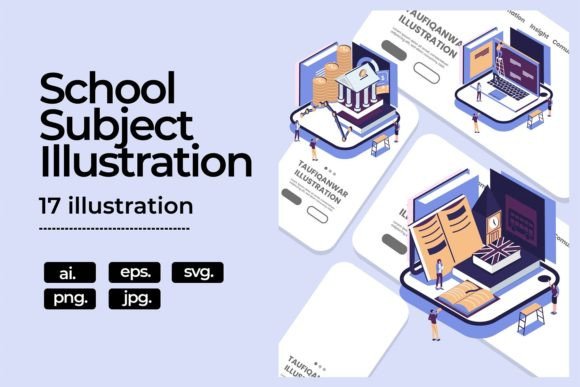
Visual assets built around academic themes carry a unique kind of energy. They tap into shared memories, structured learning, and the universal language of discovery. A collection of school subject illustrations isn’t just a retro nod—it's a versatile toolkit that can clarify complex ideas, add warmth to educational content, and make branding feel more approachable. This particular pack bundles 17 distinct school subject illustrations, each carefully constructed to support a range of design workflows. You receive five formats for five selected subjects: fully editable vector files in EPS, AI, and SVG, plus high-resolution raster versions in PNG and JPG. The remaining twelve subjects are delivered in universally compatible PNG and JPG formats, ready to drop into digital and print projects alike. All artwork uses an RGB color profile, but because the vector formats are layered and organized, you can switch to CMYK and adjust individual hues within minutes.
Why School Subject Illustrations Stand Out in Modern Design
Generic graphics rarely tell a story. A chemistry flask or a stack of books might feel ordinary, but when these icons are composed with intentional style—consistent line weights, balanced negative space, and a cohesive palette—they become building blocks for narrative-driven design. These illustrations leverage recognizable symbols without falling into clip-art territory. Math symbols, literature references, history artifacts, and musical notes are rendered with a clean, contemporary line that works across both playful and professional contexts. For brands, educators, and content creators, this means you’re not just decorating a page; you’re reinforcing context and triggering engagement through familiar visual cues.
17 Subjects, One Cohesive Visual Language
The pack covers an impressive breadth of academic fields: from Mathematics, Physics, and Chemistry to Literature, History, Geography, Art, Music, Biology, and more. What makes it especially valuable is the uniform visual treatment across all 17 subjects. Each illustration shares the same stroke style, similar iconographic density, and a balanced use of detail. This consistency allows you to mix and match elements freely—pair a microscope with a paint palette, or layer a globe behind a musical staff—and still maintain a unified look. For infographic designers, this is a massive time-saver; you can skip hunting for matching sets across different marketplaces and instead work from a single, reliable source.
Depth Without Clutter
The illustrations strike a careful balance. They are detailed enough to be engaging at larger sizes—think presentation slides, poster headers, or printable workbook covers—but they scale down cleanly for icons, badges, or mobile UI elements. Because five subjects come in editable vector formats (EPS, AI, SVG), you can dissect and simplify any composition. Need just the DNA helix from the Biology illustration? Isolate it. Want to use only the painters’ palette from Art? Duplicate the layer and remove surrounding elements. This degree of control means a single subject illustration can yield multiple derivative assets for different parts of a project.
Website Design and User Experience
When users land on a site, clear category visuals cut through cognitive noise. An e-learning platform can use subject illustrations as course thumbnails, making navigation immediate and intuitive. A tutoring service might implement them in hero section backgrounds, overlaid with translucent screens to create depth without distraction. Since PNG files are included with transparent backgrounds, you can place illustrations directly onto colored blocks, photo backgrounds, or gradient fields without awkward bounding boxes. The JPG versions, meanwhile, are optimized for faster loading in blog headers or resource pages where transparency isn’t needed.
Infographic Illustration That Tells a Story
Educational infographics demand visuals that are both accurate and accessible. With school subject illustrations at hand, you can construct a timeline of scientific discovery using equipment icons, build a step-by-step guide to writing an essay with literature-themed dividers, or compare global literacy rates with a geography-inspired legend. The editable color feature is particularly useful here: you can map specific subjects to a brand’s accent colors, or use a monochromatic scheme with one pop color for callouts. Because the source files are layered, you can even reassemble parts of different subjects into a custom hybrid graphic—a lightbulb moment with gears and a book, for instance—without starting from scratch.
Print Collateral and Workbooks
For physical materials like student planners, activity books, or educational posters, the CMYK conversion option is essential. Open the AI or EPS files, adjust the document color mode, and fine-tune blues and reds that tend to shift in print. The illustrations maintain their crisp edges at 300 DPI, so scaling to standard paper sizes is worry-free. Small business owners who create printable resources on platforms like Etsy or Teachers Pay Teachers can use these elements to give their products a polished, professional finish that stands out in a crowded market.
Ideas for Creators and Entrepreneurs
You don’t need to be an educational institution to benefit from academic visuals. Consider how these themes can refresh your existing content:
- Bloggers writing about productivity, habit-building, or self-education can use the illustrations to design quote cards, social media posts, or chapter breaks that visually anchor the topic of learning.
- Podcasters can transform subject icons into cover art elements, playing with nostalgia or curiosity to attract listeners interested in lifelong learning.
- Freelance designers who handle branding for tutoring centers, childcare programs, or educational tech startups will find a ready-made library that cuts project turnaround time in half.
- Small business owners running a stationery shop can create washi tape designs, sticker sheets, or notebook covers using the PNG files as clipping masks or repeated patterns.
Customizing Colors for Brand Alignment
The entire pack ships in RGB, which is perfect for screens. But the editable nature of the vector formats (available for the five core subjects) means you’re not locked into the stock palette. Need your company’s muted teal instead of bright blue for the biology illustration? Open the AI or SVG file and adjust globally. This is more than just a color swap—it’s about creating permission to own the illustration as part of your brand identity. Even the PNG versions can be recolored using adjustment layers or the “hue/saturation” tool in Photoshop, though vectors offer cleaner results. If you’re working on a project that will live both online and in print, start in RGB for screen iterations, then convert a copy to CMYK for the final print run. The vector structure preserves shape and crispness no matter the color space.
Maintaining Consistency Across Multi-Platform Campaigns
One of the hidden challenges of a multi-channel campaign is asset fragmentation. You might have a hand-drawn icon set for the website but need a matching style for emailed newsletters, social tiles, and printed event banners. This school subject illustration collection acts as a single source of truth. Because the styles are uniform, your Instagram story sticker set will feel naturally connected to the same math-themed diagram you use in a downloadable PDF. This visual echo builds subconscious trust with your audience. They may not consciously notice the consistent line thickness or rounded terminal shapes, but they will perceive the whole experience as more professional.
Adapting Details for Different Audience Ages
The same illustration can serve kindergarten materials and adult learning platforms with only minor tweaks. For younger audiences, consider brightening the palette, adding playful labels, or combining subjects with character elements (which you can import separately). For a corporate training module, mute the colors, frame the illustrations within clean geometric containers, and use thinner supporting lines. Since the vector files are fully editable, you can remove any details that feel too juvenile—like stars or sparkles—and replace them with simple gradients or your company’s icons. This adaptability means the pack grows with your projects rather than limiting them to one niche.
Design Tips for Non-Designers
If you’re a marketer, entrepreneur, or educator without formal design training, you can still achieve polished results by following a few simple rules:
- Stick to a maximum of three subject themes per page or screen to avoid visual clutter.
- Use the PNG formats over solid background blocks to create clear separation zones—white JPGs can look like they “float” if not anchored.
- When combining multiple illustrations in one layout, scale them so that the main focal element (like a book, globe, or beaker) occupies roughly the same visual weight.
- Apply your brand font to any text overlays, but keep the text block weight similar to the illustration stroke weight for harmony.
- Before final export, zoom out to thumbnail size. If the subject is still recognizable, the composition works.
Solving Real Design Challenges with School Subject Illustrations
Consider the entrepreneur launching a financial literacy series. Math and economics-themed illustrations aren’t just decorative—they anchor abstract concepts like compound interest or budgeting in tangible, friendly imagery. A physics subject illustration can transform a dense FAQ page about energy efficiency into a visually guided journey. For a history podcast, using a quill, old map, or hourglass illustration as the episode cover template immediately signals the genre to potential listeners scrolling through their app. These are not hypotheticals; they’re daily design decisions that separate content that gets overlooked from content that gets bookmarked.
Why Editable Formats Increase Long-Term Value
The inclusion of EPS, AI, and SVG files for five key subjects is a strategic advantage. It means you can animate these illustrations for motion graphics—each path can be exported to After Effects or web animation libraries. You can also convert the artwork into a custom icon font or resize it to billboard dimensions without any loss of quality. And because you receive both vector and raster formats, you’re covered for web use (where SVG and PNG rule) and for software that prefers JPG (like older e-book platforms). The flexibility to edit and re-save means a one-time purchase feeds into countless future projects without the mental friction of re-licensing or searching for replacements.
At its core, this collection of school subject illustrations provides a bridge between familiar academic themes and modern design demands. It respects the need for both speed and originality, giving you production-ready files that you can leave as-is or transform entirely. Whether you’re mapping out an educational infographic, refreshing a learning website, or crafting a workbook that feels nothing like a dusty textbook, these 17 subjects—with their clean lines, editable colors, and versatile formats—offer a creative foundation that’s as practical as it is inspiring.