Evaluating the Enjoy PowerPoint Presentation Template for Your Next Presentation
The Enjoy PowerPoint Presentation Template presents itself as a minimalistic, multipurpose solution designed to streamline the creation of professional slides. Whether you are preparing a client pitch, a quarterly report, or an internal strategy deck, the promise of a ready-made framework can be appealing. This article takes a measured look at what the Enjoy template actually provides, who may benefit most from using it, and where its limitations might lead you to consider other options.
What the Enjoy PowerPoint Presentation Template Includes
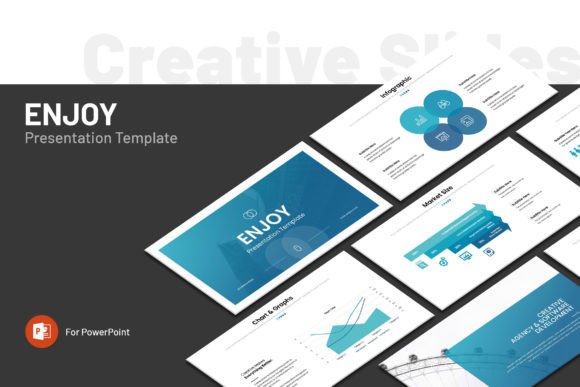
At its core, the Enjoy template is a 36-slide deck built around a clean and minimalistic aesthetic. The design avoids visual clutter, which can be a significant advantage when your content needs to carry the message without distraction. The package includes a variety of infographic elements, charts, graphs, maps, and icons that are integrated into the slide layouts. These visual components are intended to help you translate data and concepts into formats that audiences can quickly grasp.
The template operates on a master slide layout system, meaning you can make global changes to fonts, colors, and placeholder positions without editing each slide individually. This saves time and helps maintain consistency across the entire presentation. The files are delivered in the standard PPTX format, making them compatible with Microsoft PowerPoint on both Windows and Apple systems. The slides are set to a 16:9 Full HD ratio of 1920 by 1080 pixels, which matches most modern displays and projectors without awkward letterboxing.
One practical detail worth noting is that the template uses free fonts, with a link provided in the help file for easy downloading. The graphics are described as fully resizable and editable, and adding a picture is meant to be as straightforward as a drag-and-drop action. Importantly, images are not included with the template. The preview photos you might see in demonstrations serve as placeholders, and you will need to supply your own photography or imagery.
Designed for Users With Varying Technical Comfort
A distinct feature of the Enjoy template is how it accommodates different skill levels. Not everyone who needs to build a presentation has deep experience with PowerPoint. For those who may feel intimidated by complex software, the drag-and-drop functionality and pre-arranged layouts lower the barrier to entry. You do not need to know how to build a chart from scratch or align elements with pixel precision because much of that foundational work has already been completed.
For more experienced users, the editable vector-based graphics and master slide structure offer room for deeper customization. You can adjust colors to match brand guidelines, modify the shape of infographic elements, or restructure entire sections to suit your narrative flow. The template is not locked down in a way that restricts advanced modifications, which gives it flexibility across a range of use cases and user abilities.
This dual-layer accessibility is often what makes the difference between a template that gets used once and one that becomes a recurring tool. When a team includes both design-savvy members and those who struggle with layout decisions, having a common starting point that everyone can work from reduces friction and keeps output consistent.
Practical Benefits of a Minimalistic Design Approach
Minimalism in presentation design is not simply a visual preference. It directly impacts how an audience processes information. Slides that are stripped of unnecessary decorations allow viewers to focus on the data, the narrative, and the presenter. The Enjoy template leans into this principle by providing layouts that prioritize readability and clear hierarchy. Headlines, body text, and supporting visuals have defined roles, and the spacing between elements creates natural pauses that guide attention.
From a practical standpoint, minimalistic templates are also easier to edit and repurpose. When you remove the complexity of layered textures, intricate backgrounds, or heavily stylized elements, the time required to adapt a slide to new content shrinks considerably. If you are working under a tight deadline, this efficiency can be the difference between delivering a polished presentation and one that feels rushed.
Tradeoffs and Important Considerations
No template is a perfect fit for every scenario, and the Enjoy PowerPoint Presentation Template carries a few tradeoffs worth examining before you commit. First, the absence of included images means you bear full responsibility for sourcing high-quality visuals. If your project depends heavily on photography and you do not have access to a stock image library, you will need to budget extra time and possibly expense for acquiring appropriate assets.
Second, while 36 slides provide a solid foundation, this preset count may feel constraining if your presentation needs to run significantly longer or shorter. Expanding the deck is possible by duplicating slides and adjusting content, but you may find yourself repeating layouts in ways that reduce variety. On the other end, if you only need a short 10-slide deck, you will need to carefully select and possibly discard slides, which can make the initial investment feel less efficient.
The template's minimalistic nature also means that if you are working in an industry where bold, highly stylized visuals are expected, the restrained design language may not align with audience expectations. Creative agencies, fashion brands, or entertainment-focused presentations sometimes demand a more expressive visual identity than a minimal template can provide without significant modification.
Situations Where Enjoy Is a Strong Fit
The Enjoy template aligns well with business environments that value clarity and efficiency. Corporate communications, investor updates, strategy proposals, and data-heavy reports all benefit from a structured and uncluttered visual framework. The included charts, graphs, and infographic elements reduce the manual effort of building data visualizations from scratch, which can be a meaningful advantage if you are presenting quarterly metrics or competitive analysis.
Startups and small business owners who need to produce professional-looking pitch decks without hiring a designer may also find the template useful. The ability to present a polished brand image during investor meetings or client introductions can influence credibility, and a template that does much of the design heavy lifting supports that goal without requiring specialized skills.
Educators and consultants who deliver regular presentations will appreciate the consistency that a master-slide system provides. When you build a series of presentations over time, maintaining a uniform look reinforces your professional identity. The template becomes a reusable asset rather than a one-off solution.
When Alternatives May Be Worth Considering
If your presentation requires highly specialized visual storytelling, such as animated sequences, interactive elements, or embedded multimedia beyond static graphics, a minimalistic PowerPoint template may not offer enough native capability. In such cases, tools like Prezi or custom-designed Keynote presentations might deliver more of what you need, though they typically require a steeper learning curve or design investment.
For users who need extensive image placeholders with pre-applied filters, style treatments, or frame designs, a template that includes these features as built-in elements might save more time. Some competing templates bundle coordinating image masks, photo collages, and textured backgrounds that the Enjoy template intentionally avoids in its minimal approach. Understanding your personal or brand aesthetic before selecting a template will help you determine whether minimalism serves or hinders your message.
Larger organizations with strict brand guidelines should also verify that the template's editable elements can be fully adapted to match internal standards. While the template allows for customization, certain structural aspects may require more effort than a template designed specifically for a particular brand identity. Testing the master slide flexibility with a single slide before committing to a full deck build can provide useful clarity.
Support and Post-Purchase Assistance
The availability of real support from a skilled designer is a meaningful factor when evaluating any digital product. The Enjoy template includes access to help if you encounter issues or have questions about customization. This type of support can reduce downtime when you are working against a deadline. If you have never used a PowerPoint template with advanced features before, knowing that assistance is available can make the experience less intimidating and more productive.
Making an Informed Decision
Deciding whether the Enjoy PowerPoint Presentation Template fits your needs comes down to a few practical questions. Does your content benefit from a clean, minimal visual framework? Are you comfortable sourcing your own imagery? Do the included infographic elements, charts, and maps cover the types of data you need to present? Will the 36-slide structure provide a strong starting point without requiring you to delete or heavily reconfigure large portions of the deck?
Reflect on your typical presentation workflow. If you tend to spend too much time on slide design and not enough on content refinement, a template that handles layout decisions can help you redirect your effort where it matters most. If you already have a deeply established visual style that diverges from minimalism, you may either need to invest more time in customization or look for a template that starts closer to your desired outcome.
The Enjoy template's balancing act between simplicity and visual utility makes it a credible option for a wide audience. It does not attempt to solve every presentation challenge, but it provides a solid, well-structured foundation that can be molded to fit a variety of professional contexts. Understanding the tradeoffs, the scope of what is included, and the situations where alternative tools or templates might serve you better will lead you to a choice that aligns with both your immediate presentation needs and your long-term workflow.