Evaluating Presentation Design: The Role of the Manixa Keynote Template
In the landscape of professional communication, a presentation's visual design is not merely decorative; it is a critical component of how information is received and understood. For users of Apple's Keynote software, finding a template that balances aesthetic cohesion, flexibility, and efficiency can significantly impact the preparation process and final outcome. The Manixa Keynote Template represents one such option, designed to provide a structured foundation for creating slides. This article examines its characteristics, practical applications, and how it fits within the broader context of presentation design resources, aiming to help you determine if it aligns with your specific needs.
What Constitutes the Manixa Keynote Template
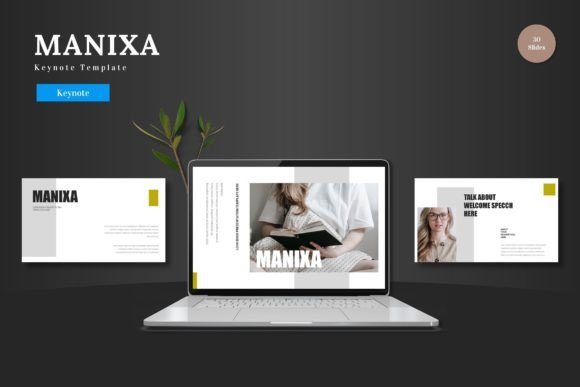
The Manixa Keynote Template is a pre-designed slide deck framework. Its core proposition is to offer a cohesive and visually engaging experience from the outset, minimizing the time spent on foundational design decisions. The template provides 150 total slides distributed across 5 distinct premade color schemes, yielding 30 slides for each thematic palette. This structure includes dedicated section break slides, handcrafted infographics built on master slide layouts, and a collection of pixel-perfect illustrations.
A defining feature is its emphasis on customization within a guided framework. Users can effortlessly modify layouts, fonts, and colors to match their brand or topic. All graphic elements are resizable and editable, and the template incorporates practical assets like picture placeholder areas designed for drag-and-drop functionality, as well as slides tailored for gallery and portfolio presentations. The main supplied file includes the core Keynote document with 30 slides, accompanied by five color schemes, a readme file, and information on fonts and photography usage.
Distinguishing Factors and Design Philosophy
Compared to the default templates available in Keynote or many freely distributed alternatives, the Manixa template distinguishes itself through volume and systematic variation. Offering 150 slides across five colors is a significant quantity, suggesting it is built for longer or more varied presentations where maintaining visual consistency across multiple sections is key. The inclusion of handcrafted infographics based on master slides is noteworthy. This approach ensures that charts, diagrams, and data visualizations are not isolated elements but are integrated into the overall design language, which can aid in creating a more professional and unified narrative.
The provision of resizable and editable vector graphics and illustrations offers a practical advantage. It moves beyond static image placeholders, allowing users to adjust icon sizes, change illustration colors to match their chosen scheme, or modify shapes without requiring separate graphic design software. This level of embedded flexibility is a tradeoff some templates make—offering more control at the potential cost of a more complex file structure. For a user comfortable with Keynote's editing tools, it can be a substantial benefit.
Comparative Considerations in Template Selection
When evaluating any premium template like Manixa, it is useful to consider the spectrum of available options. Alternatives range from minimalist, single-theme packs focusing on clean typography, to massive bundles with thousands of slides covering every conceivable niche. The decision often hinges on the required balance between specificity and adaptability.
A template with five rigid color schemes, like Manixa, provides clear starting points but may require more intensive customization if your organization's palette falls outside those options. Conversely, a template offering dozens of color variants might feel overwhelming or less cohesively designed. The infographic and illustration style is another pivotal comparison point. Some templates use very abstract, modern icons, while others opt for more literal, business-centric imagery. The pixel-perfect, handcrafted nature of Manixa's assets suggests a focus on clarity and detail, which may suit formal business, educational, or detailed technical presentations better than highly casual or artistic contexts.
Strengths and Potential Application Scenarios
The apparent strengths of the Manixa Keynote Template lie in its structured completeness and integrated design elements. For a professional or educator who needs to produce a comprehensive presentation—such as a company annual review, a multi-module training course, or a detailed project proposal—having a large set of pre-styled slides can drastically reduce production time. The section break slides and multiple color schemes can help visually segment different parts of the presentation, enhancing audience comprehension.
Its best-fit situation is likely for users who value a strong starting design but also require customization control. An individual or team with a basic understanding of Keynote, who wants to avoid building every slide from a blank canvas but also needs to tailor the presentation to specific content, would find this template advantageous. The resizable graphics and editable illustrations are particularly useful for those who lack access to a dedicated graphic designer but need to incorporate custom visual data.
Understanding Limitations and Tradeoffs
No template is universally optimal, and understanding limitations is key to informed selection. The Manixa template's design, while customizable, carries its own inherent aesthetic. If your project demands a radically different visual style—such as a gritty, textured look or a purely minimalist, text-only approach—adapting this template might require more work than starting with a simpler base or a different template altogether.
The organization of 30 slides per color scheme implies a logic and sequence predefined by the designer. Users must evaluate whether this slide flow and variety (including the specific gallery, portfolio, and infographic slides) matches their presentation's narrative structure. There is a tradeoff between the efficiency of using predefined layouts and the creative constraint of potentially having to fit your content into those molds. Furthermore, the template's utility is inherently tied to the Keynote ecosystem. For teams or environments that operate cross-platform or primarily use PowerPoint, this investment would not be applicable.
When the Manixa Keynote Template Is the Right Choice
This template may be the right choice under several realistic conditions. First, when the presenter's goal is to impress an audience and leave a lasting mark through a polished, visually consistent deck, and the time or skill to create that polish from scratch is limited. Second, when the presentation content is substantial, requiring diverse slide types (title slides, text layouts, data charts, image showcases, conclusion slides) that benefit from a unified design family. Third, when the presenter's brand or topic colors align reasonably well with one of the five provided schemes, or when they possess the willingness to modify the palette using Keynote's tools.
Consider a marketing manager preparing a keynote for a product launch. They need to present market analysis (infographics), showcase product features (gallery slides), detail the rollout plan (text and list slides), and maintain the company's visual identity. The Manixa Keynote Template could provide a rapid foundation, with infographics that can be adapted for their data and gallery slides ready for product images, all while allowing color adjustment to match brand guidelines.
When You Might Need an Alternative Option
An alternative should be sought if your requirements diverge significantly from the template's core offerings. If your presentations are typically very short (under 10 slides), a massive 150-slide template might be unnecessary and cumbersome. If your work demands absolute, brand-specific visual conformity from the first slide—where even the provided illustrations and icon style clash with your established identity—a more generic or completely custom-designed template might be preferable.
Similarly, if you prioritize mobility and collaboration across different presentation software, locking into a Keynote-specific asset may not be strategic. Also, for presenters who thrive on entirely original, artistic design where pre-made elements feel restrictive, the benefits of a template like Manixa diminish. In such cases, resources like advanced Keynote training, access to custom illustration libraries, or even hiring a designer for a one-off master slide set could yield a better fit.
Making an Informed Decision
The decision to use the Manixa Keynote Template, or any similar resource, ultimately rests on a clear assessment of your project's demands, your own skills, and your tools. Evaluate the scope, style, and software constraints of your upcoming presentations. Scrutinize sample slides of the template, if available, to see if the layout logic and aesthetic resonate with your content. Consider whether the included assets—like the infographics and illustrations—are types you frequently need or can adapt.
Remember, a good template is a productivity tool and a design guide, not a substitute for compelling content. The Manixa Keynote Template appears designed to handle that guiding role extensively, offering a large library of styled components to build upon. By weighing its structured cohesion and customization features against your need for specific style and narrative flow, you can make a more grounded choice that aligns with your practical objectives for creating effective and engaging presentations.