Etunora: The Keynote Template That Actually Gets You From Idea to Presentation
You have the idea. You have the data. You have the vision. The last thing standing between you and your audience is that daunting blank slide. Crafting a presentation from scratch eats up hours you don’t have—hours spent fiddling with alignment, hunting for consistent icons, and wrestling with color schemes that never quite look right. This is where a well-designed template becomes more than just a set of slides; it becomes a strategic shortcut. Etunora - Keynote Template is built for that exact moment.
What Etunora Actually Is
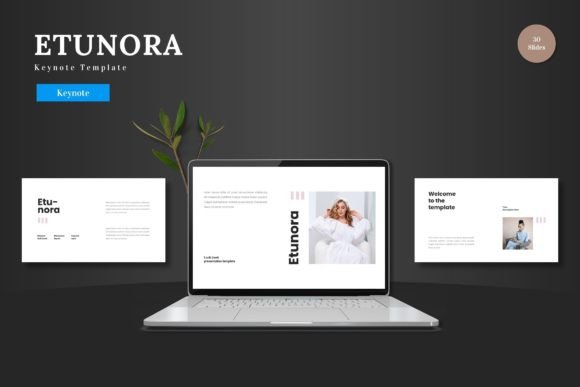
Etunora isn't just another bundle of pretty slides. It's a complete, editable framework designed specifically for Keynote. Think of it as a professional design team handing you a perfectly structured, visually cohesive deck where your only job is to input your content. It arrives with 150 total slides, organized across 5 distinct color schemes. That means you get 30 meticulously crafted slides for each color variation—blue, green, red, or whatever suits your brand—so you can maintain a consistent look from the first slide to the last without starting over. Everything, from the master slides that control the overall layout to the pixel-perfect illustrations and handcrafted infographics, is resizable and editable directly within Keynote. You don’t need to open Photoshop or Illustrator. You simply double-click a placeholder, insert your image, and it snaps into the design. You change a color on the master slide, and it updates across the entire presentation. This is about control without complexity.
The Real-World Situations Where Etunora Shines
Consider the freelance designer pitching a new branding concept to a skeptical client. She needs to show not just logos, but a narrative of market positioning, user journeys, and visual evolution. With Etunora, she drags-and-drops her mockups into the gallery slides, uses the infographic slides to map out the user journey with clarity, and leverages the clean, scalable layouts to make her professional work look even more polished. The template handles the visual heavy lifting, letting her focus on her story.
Or take the startup founder racing to prepare a pitch deck for investor meetings next week. He has the financial projections and the product roadmap, but he knows a cluttered, amateur slide deck can undermine credibility. He opens Etunora, chooses the color scheme that matches his startup's app, and uses the pre-built data slides and portfolio sections to present his numbers and prototypes compellingly. The animated slides add a touch of dynamism to key reveals without requiring him to learn complex animation tools. He’s not designing; he’s assembling his case with confidence.
Beyond Business: Where Creators and Educators Apply It
The applications extend far beyond the boardroom. A blogger creating a video course wants to supplement her tutorials with downloadable slide decks. Using Etunora, she quickly generates clean, visually appealing educational slides for each module, ensuring her online brand looks consistent and professional. An educator preparing a workshop for a conference can replace the generic academic templates with Etunora’s vibrant, engaging slides, making complex topics more accessible through clear infographics and structured section breaks.
Even for personal projects—like planning a family reunion presentation, visualizing a home renovation project, or crafting a memorable slideshow for a celebration—having a structured, beautiful template prevents the project from becoming a design headache. The multipurpose nature of Etunora means it adapts to the content you bring to it, whether that’s quarterly sales figures or a portfolio of wedding photography.
Connecting Features to Tangible Outcomes
The feature list reads like a checklist, but the real value is in the outcomes they enable. The “150 Total Slides on 5 Premade Colors” means you have depth and choice. You’re not stuck with one look; if your company rebrands, you can switch the entire deck’s color palette without rebuilding it. The “Picture Placeholder, Drag & Drop” feature isn’t just a technical point—it translates to saving 15 minutes per image slide, removing the frustration of manual cropping and fitting. The “All Graphics Resizable and Editable” directly addresses that moment when you need to tweak an icon slightly to better represent your specific service. You can do it right there, in Keynote.
The inclusion of animated slides offers a practical benefit: giving your presentation a moment of focus. Used on a key summary slide or a big reveal, it draws the audience's attention without you needing to become a motion graphics expert. And because everything is based on master slides, changing the font for the entire presentation is a one-click affair, guaranteeing typographic consistency that is often painstaking to achieve manually.
What to Consider Before You Start
Before downloading any template, including Etunora, it’s wise to match it to your actual workflow. First, confirm you use Keynote. This template is built exclusively for it, leveraging its native features for editing. If you primarily use PowerPoint, this isn’t the right tool. Second, think about your typical presentation length and style. Etunora’s volume is great for longer, structured presentations like detailed reports, product launches, or full course modules. If you only ever need 5-slide quick updates, its breadth might be more than you need, though its organization helps even there.
Finally, assess your own comfort with basic Keynote functions. Etunora removes the need for advanced design skill, but you should be comfortable with tasks like replacing text, dragging images into placeholders, and using the color picker. The provided Readme file and font information are there to get you started smoothly. The goal is to have you presenting your slides to the world, not learning a new software.
In essence, Etunora - Keynote Template serves as a bridge. It bridges the gap between having great content and presenting it with great form. It turns the universal task of slide creation from a chore into a streamlined process. For the entrepreneur, it’s about credibility. For the creator, it’s about brand consistency. For the educator or hobbyist, it’s about clear communication without design fatigue. By giving you a clean, scalable, and fully editable foundation, it lets you focus on what matters most: what you’re saying, and who you’re saying it to.