Your Presentation’s Foundation: Exploring the Munirom Keynote Template
Creating a compelling presentation can feel like building a house. You need a solid foundation, a reliable structure, and the freedom to customize the interior to suit your exact vision. For many professionals and creators, that foundational blueprint is a well-designed template. The Munirom - Keynote Template is one such blueprint, offering a comprehensive starting point for a wide array of presentation needs. It’s more than just a set of slides; it’s a designed system intended to save time, maintain quality, and provide creative flexibility directly within Apple’s Keynote application.
What Is the Munirom Template Designed For?
At its core, the Munirom Keynote Template is a multipurpose toolkit. Its design philosophy centers on being clean, scalable, and colorful. This combination addresses a common challenge: the need for a presentation that looks professionally crafted without requiring professional design skills. The template is explicitly suited for business presentations, pitch decks, e-commerce showcases, and product promotions. Whether you’re a startup founder pitching to investors, a marketing manager presenting a new campaign, or a freelancer showcasing portfolio work, the structure is built to adapt. The promise is that you can serve all business or personal needs while maintaining a consistent, high-quality visual standard.
A Closer Look at the Working Mechanics
The operational appeal of the Munirom template lies in its integrated editing approach. All elements are editable directly within Keynote. There is no need for another software like Photoshop or Illustrator to adjust graphics. This is a significant practical benefit. You input your content, replace images by dragging them into placeholders, change colors to match your brand, and modify text with ease. The package also includes animated slides, allowing you to add dynamic elements without starting from scratch. This streamlined process—from editing to presenting—embodies the “ready to use” claim.
Breaking Down the Features and Contents
The value of a template is often quantified by its assets and flexibility. The Munirom - Keynote Template provides a substantial volume of material.
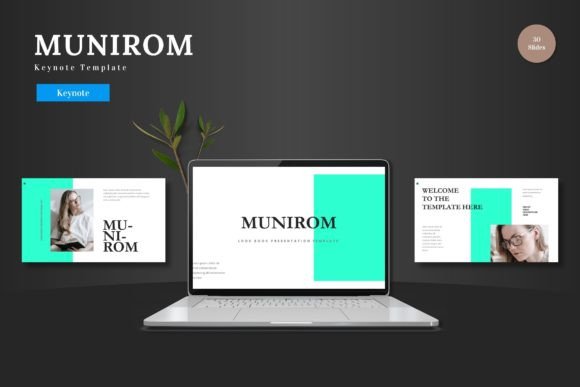
- 150 Total Slides: These are distributed across 5 premade color schemes, offering 30 slides for each color variant.
- Structural Variety: It includes section break slides, handcrafted infographics, and dedicated slides for galleries and portfolios.
- Design Integrity: Graphics are based on master slides, ensuring consistency. They are described as pixel-perfect illustrations, resizable and editable without loss of quality.
- Complete Package: The main file includes 5 Keynote files (one for each color), the 30 slides per theme, and a folder with the color schemes. Supporting files like a readme, font information, and photo credits are also provided.
This feature set is not merely a list; it’s a toolkit. The five color variations allow you to set a mood—perhaps a vibrant scheme for a product launch or a subdued, professional palette for a corporate report. The infographics and illustrations serve as visual shorthand for complex data, saving you hours of design work.
Who Stands to Benefit Most?
The template’s multipurpose nature means its potential audience is broad. General consumers planning a personal project like a family album or event recap can use it. Professionals across fields—consultants, educators, sales teams—require quick, polished decks. Creators and business owners often need to promote their work or ideas visually without a dedicated design budget. Finally, online users seeking practical solutions for routine presentation tasks will find its ease-of-use appealing. The common thread is a need for efficiency paired with a professional outcome.
Real-World Scenarios and Applications
Imagine a small business owner launching a new online store. Using the Munirom Keynote Template, they can quickly populate the e-commerce-oriented slides with product images, use the infographics to explain their market position, and employ the animated slides to highlight key offers in a team meeting. The color scheme can be adjusted to match their brand’s website, creating a cohesive visual identity across platforms.
Consider a freelance designer presenting a portfolio to a potential client. The gallery and portfolio slides offer a structured yet beautiful way to showcase past work. Because all elements are editable, the designer can tweak layouts to emphasize certain projects, ensuring the presentation feels personal and curated, not generic.
For an internal business project, a manager might use the template’s clean business slides to report on quarterly results. The master slide-based infographics ensure that charts and graphs are uniform, making the data easy for the team to digest. The ability to edit everything in Keynote means last-minute updates from the finance department can be incorporated swiftly before the presentation.
Evaluating Suitability for Your Project
While the Munirom - Keynote Template offers extensive resources, evaluating its fit for your specific need is wise. Its strengths are clear: volume of slides, design coherence, color options, and Keynote-native editing. However, considerations exist. The template is fundamentally a Keynote product; users of PowerPoint or Google Slides cannot use it directly. Its style—clean and colorful—might not suit every brand’s aesthetic if a very minimalist or ultra-specific thematic look is required. Furthermore, having 150 slides across 5 colors is powerful, but it also requires you to navigate and choose, which might be overwhelming for someone seeking a very simple, 10-slide deck.
A practical approach is to match the template’s offerings with your project’s scope. If you need a full-featured, visually consistent presentation and you work in Keynote, it is a strong candidate. If your needs are extremely niche or your brand guidelines deviate significantly from the template’s core styles, more customization will be necessary, though the editable nature does facilitate that. Ultimately, it serves as an excellent foundation, but the final presentation’s effectiveness will always depend on the quality of the content you place within its structure.
The End Goal: Presenting Your Ideas to the World
Any template’s ultimate purpose is to help you communicate more effectively. The Munirom Keynote Template aims to remove the technical and design barriers that often slow down this process. By providing a robust, editable framework, it allows you to focus on your message, your data, and your story. The inclusion of animated slides and contemporary infographics means your presentation can engage audiences with both substance and style. From the first slide to the last, the template supports a journey from idea to delivery.
In the realm of presentation tools, a good template is like a trusted guide. It shows you a path but lets you choose your pace and scenery. The Munirom - Keynote Template, with its comprehensive slide sets, color variations, and dedicated editing environment, strives to be that guide for Keynote users. Whether your next presentation is for a boardroom, a classroom, or a client meeting, having such a structured, yet flexible, starting point can make the process not just easier, but also more creative and ultimately, more successful. Cheers to that.