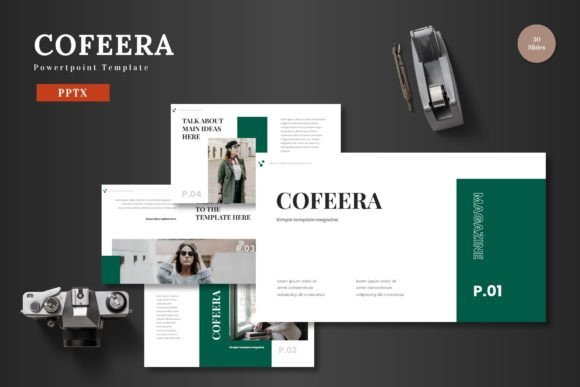
Cofeera Powerpoint Template: A Practical Tool for Professional Presentations
In the landscape of modern business communication, a presentation is more than just slides; it's a strategic asset. Whether you're pitching to investors, onboarding a team, promoting a new product, or delivering a quarterly report, the clarity and professionalism of your visual materials directly impact your message's reception. The Cofeera Powerpoint Template is designed to serve as a foundational tool within this critical workflow, offering a ready-to-use, fully editable framework that accelerates creation while maintaining high design standards.
Where Cofeera Fits Into Your Presentation Process
Creating a compelling presentation typically involves several phases: content planning, visual design, assembly, review, and final delivery. The Cofeera Powerpoint Template integrates primarily into the design and assembly stages, acting as a bridge between your raw content and a polished final product. Instead of starting from a blank slide—a process that consumes time and requires significant design skill—you begin with a structured, aesthetically coherent set of slides. This allows you to focus your energy on refining your narrative and data rather than wrestling with alignment, color schemes, or layout consistency.
For professionals, marketers, and entrepreneurs, this integration is crucial. Your workflow often involves juggling multiple projects under tight deadlines. Having a reliable template means you can initiate a new presentation immediately after a planning session, inputting your key points directly into a professionally designed container. The template's multipurpose nature, suitable for business, pitch decks, e-commerce, or product promotion, means it adapts to your need without requiring you to search for a new design solution for each different type of presentation.
Core Features and Practical Application
The Cofeera Powerpoint Template package is built around practical utility. With 150 total slides distributed across 5 premade color variations, it provides substantial depth. The organization into 30 slides for each template section offers a logical structure, helping you build presentations with a natural flow from introduction to conclusion.
Editing Within Your Existing Ecosystem
A significant efficiency gain comes from the template's commitment to operating entirely within PowerPoint. All elements are editable directly in PowerPoint Slides. There is no need for another software like Adobe Illustrator or Photoshop to adjust graphics. This is a key consideration for workflow integration. You aren't introducing a new, specialized tool that requires learning or license management; you are enhancing the tool you already use. For educators, freelancers, and small business owners who may not have access or expertise in advanced design software, this eliminates a major barrier.
The editing process is straightforward: input your content into the provided text boxes, replace images by dragging and dropping into the picture placeholder, and change colors using PowerPoint's native color palette tools. The inclusion of handcrafted infographics based on master slides ensures that charts, diagrams, and process flows are not only pixel-perfect but also consistent. When you resize or edit these graphics, they maintain their visual integrity, which is vital for quality control across long or complex presentations.
Integrating Cofeera into Specific Workflows
Consider a common scenario: a startup founder developing a pitch deck for investor meetings. The process begins with market research, financial modeling, and story crafting. Once the core content is drafted, the founder opens the Cofeera Powerpoint Template. They select a color variation that aligns with their brand identity. Using the portfolio and gallery slides, they insert product mockups and team photos via simple drag-and-drop. The pre-animated slides add a dynamic element for key reveals, such as the funding request or growth trajectory, which can be refined directly within PowerPoint without learning separate animation software. The entire deck is assembled, consistent, and ready for internal review in a fraction of the time it would take to design from scratch.
For a marketing manager launching a new campaign, the template serves during the internal alignment phase. They can use the structured sections to create a clear briefing presentation for the sales and creative teams. The editable infographics are perfect for visualizing campaign timelines, budget allocation, and expected ROI. Because all graphics are resizable, they can adapt these infographics for other collateral, like internal newsletters or one-page summaries, ensuring visual consistency across all campaign materials—a factor that improves organizational communication and reduces confusion.
Long-Term Usability and Asset Management
Investment in a quality template like Cofeera isn't for a single use. Its multipurpose design and five color schemes make it a reusable asset. A consultant, for instance, might use the blue scheme for corporate client presentations, the green scheme for environmental project updates, and a brighter variation for public workshop materials. All files are contained in the main package (5 PPTX files), organized with a Readme and font information for proper setup. This organization aids long-term use; you can store the template folder alongside your other core business assets, knowing it's ready for any presentation task that arises in the future.
Furthermore, the scalability of the template supports presentations of varying lengths. You might use only 10 slides for a quick team huddle or leverage the full breadth of slides for a comprehensive annual report. The master slide foundation ensures that even when you add custom slides, they adhere to the template's overall style, preserving a professional look. This scalability is particularly useful for bloggers and content creators who produce presentations for both small online audiences and large industry conferences.
Factors for Smooth Implementation
To integrate the Cofeera Powerpoint Template smoothly into your routine, a small amount of preparation is beneficial. First, review the provided "Readme First" and font information to ensure your PowerPoint version is compatible and you install any recommended fonts. This upfront step prevents last-minute formatting issues. Next, spend 15 minutes exploring the template. Open one of the PPTX files, navigate through the different section break slides, and practice changing a color on an infographic. This familiarization reduces friction when you are under pressure to create.
In terms of workflow, a practical tip is to treat the template as your "first draft." Begin by populating the slides with your core content in a rough form. Don't strive for perfection on the first pass. Because the design is already handled, you can focus on getting your ideas down. Then, iterate: refine the text, swap out placeholder images for your final visuals, and adjust the color highlights to emphasize key sections. This process-oriented approach mirrors how you would write a report or plan a project—start with structure, then enhance detail.
Maintaining Quality and Professionalism
One of the less obvious benefits of using a well-crafted template is the enforcement of quality standards. For individuals and teams without dedicated design resources, visual quality can fluctuate. The Cofeera Powerpoint Template acts as a quality control mechanism. By providing a clean, scalable, and colorful foundation, it elevates the baseline of every presentation you create. This consistency builds your professional or brand identity over time. Clients, students, or stakeholders come to recognize your materials as coherent and reliable, which reinforces the credibility of your content itself.
The template also interacts positively with other tools and assets. You can easily incorporate charts exported from Excel, screenshots from software demos, or photographs from your product library into the picture placeholder. Because the layout is designed to accommodate these elements gracefully, the final presentation feels unified, not patched together. For publishers and educators who often combine materials from various sources, this interoperability is essential for creating a seamless learning or communication experience.
Ultimately, the Cofeera Powerpoint Template is a practical implementation tool. It addresses the real-world need for speed, consistency, and aesthetic quality in presentation creation. By fitting directly into the PowerPoint environment you already use, it minimizes disruption and maximizes productivity. Whether your next presentation is for a critical business decision, a creative project showcase, or a personal goal review, having a robust template at hand transforms the task from a design challenge into a focused content delivery exercise, letting your ideas shine with the visual support they deserve.