Evaluating the Dubida Keynote Template for Presentation Design
For professionals and individuals creating presentations, selecting the right template is a foundational decision that impacts both the design process and the final outcome. The Dubida - Keynote Template is one such option, marketed as a clean, scalable, and multipurpose set of slides designed for use within Apple's Keynote application. This article provides an objective evaluation of this template, exploring its features, potential benefits, and considerations to help you determine if it aligns with your specific presentation needs.
What Is the Dubida Keynote Template?
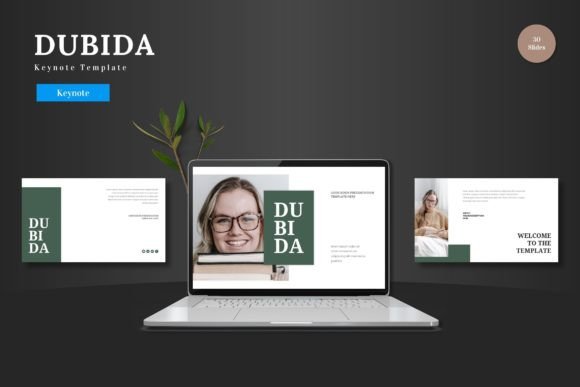
The Dubida - Keynote Template is a pre-designed collection of slides for Keynote. It is described as a complete package featuring 150 total slides distributed across five distinct color variations, with 30 slides per color scheme. The core promise is that all design elements are editable directly within Keynote, eliminating the need for additional graphic software. Users can input content, replace images in placeholder areas, and adjust colors. The template includes animated slides, handcrafted infographics, pixel-perfect illustrations, and specific slides for galleries or portfolios. The main file includes the Keynote document, a color scheme, and supporting information files.
Key Features and Potential Benefits
When evaluating a presentation template, its feature set often correlates with practical benefits for the user.
Comprehensive Volume and Variety
A template offering 150 slides across five colors provides a significant reservoir of layout options. For a user creating a lengthy pitch deck, business report, or product promotion, this volume can reduce the time spent on designing individual slides from scratch. The five color variations offer immediate visual theme alternatives, which can be useful for tailoring a presentation to different brands, moods, or audiences without starting a new file.
Editable Within Keynote
The assertion that all elements are editable solely within Keynote is a notable benefit for users committed to that ecosystem. If accurate, this means resizing graphics, changing colors, and modifying infographics can be done without switching to applications like Adobe Illustrator. This can streamline the workflow, particularly for users who are proficient in Keynote but less skilled in standalone graphic design tools.
Specialized Slide Types
The inclusion of handcrafted infographics, portfolio slides, and animated transitions addresses common presentation needs. Well-designed infographics can help communicate data more effectively, while dedicated gallery slides simplify showcasing products or images. Animated slides, when used judiciously, can add a layer of polish and help guide audience attention during live presentations.
Tradeoffs and Important Considerations
While the feature list is robust, a balanced evaluation requires examining potential tradeoffs and practical considerations.
Dependence on Keynote Proficiency
The template's benefits are fully realized only if the user is comfortable with Keynote's editing capabilities. While it claims to eliminate the need for other software, complex edits to master slides or intricate illustrations still require a working knowledge of Keynote's tools. Users unfamiliar with the application might not achieve the intended level of customization.
Risk of Generic Design
Premade templates, especially those labeled as "multipurpose," can sometimes lead to presentations that feel generic or similar to others using the same template. While the Dubida Keynote Template offers color variations, the underlying layouts and illustration styles might not offer enough uniqueness for brands requiring a highly distinctive visual identity. The user must invest time in personalizing content and images to overcome this potential drawback.
File Management and Usability
A template with 150 slides requires good file management. Navigating such a large number of master slides and variations within a single Keynote file can be overwhelming. Users should expect to spend initial time exploring the template, deleting unused slides, and organizing the ones relevant to their project to maintain an efficient workflow.
Situations Where Dubida May Be a Strong Fit
Understanding context helps match tools to tasks. The Dubida - Keynote Template could be a compelling choice in several scenarios.
For business professionals, entrepreneurs, or marketing teams who regularly need to create polished presentations for internal reviews, client pitches, or product launches, the template's volume and ready-made infographics can speed up production. Its suitability for e-commerce or product promotion, as mentioned, suggests layouts optimized for showcasing features and benefits visually.
Individuals or small teams without a dedicated graphic designer but with access to Keynote can leverage this template to achieve a professional baseline aesthetic. The editable nature allows for basic branding adjustments like color and logo insertion. The inclusion of animated slides can benefit users presenting in-person or via video conference, where dynamic elements can enhance engagement.
When Alternatives Might Be Worth Considering
Despite its features, alternatives should be considered in certain situations.
For projects demanding truly unique, custom illustration and layout design that reflects a specific artistic direction, hiring a designer or using more advanced graphic design software might yield better results than modifying a pre-made template. The Dubida Keynote Template, while editable, starts from a predefined visual foundation.
Users who do not use Apple's Keynote application, or who work in cross-platform environments where PowerPoint or Google Slides is the standard, should obviously seek templates native to those platforms. The value of the Dubida package is contingent on working within Keynote.
If the presentation need is exceptionally simple—such as a short, text-heavy internal memo—the complexity of a 150-slide template might be unnecessary. Simpler, free templates or even starting from a blank slate could be more efficient.
Practical Decision-Making Insights
To decide if the Dubida Keynote Template is right for you, conduct a practical assessment of your needs.
First, evaluate your proficiency and software commitment. Are you and your team comfortable using Keynote for intermediate to advanced editing? Is Keynote the required or preferred presentation tool in your workflow?
Second, consider the scope and frequency of your presentations. Do you create lengthy, visually complex decks often enough to justify leveraging a large template library? A one-off presentation might not warrant it, whereas regular creation could make it a time-saving asset.
Third, audit your branding and customization needs. Can your brand's visual requirements (colors, fonts, imagery style) be adequately met by modifying this template? Review the provided color schemes and illustration style to see if they can align with or adapt to your identity.
Ultimately, the Dubida - Keynote Template presents itself as a comprehensive toolkit for Keynote users seeking to enhance their design efficiency. Its value hinges on the alignment between its multipurpose, editable features and the user's specific context: their software choice, design skill, presentation volume, and uniqueness requirements. By weighing the benefits of a ready-made structure against the considerations of customization limits and platform dependence, you can make an informed decision on whether this template serves as a helpful resource or if an alternative path better suits your goals.