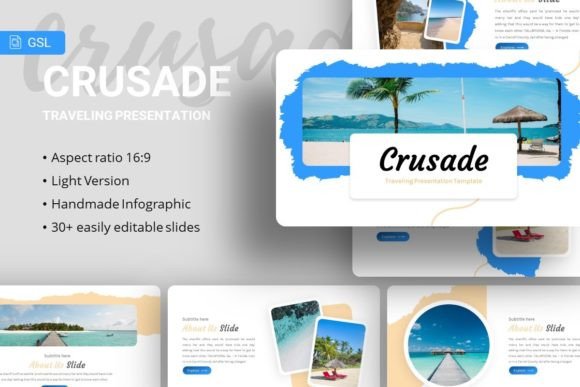
Elevate Your Ideas with the Crusade Google Slides Template
Crafting a compelling presentation is often a significant hurdle, consuming time and creative energy. For many, the struggle lies not in the content itself, but in the visual design that supports it. The Google Slides - Crusade presentation template directly addresses this challenge. It is a professionally designed, fully editable slide deck that provides a ready-made, visually striking framework for your ideas.
A Foundation Built for Flexibility and Impact
The core purpose of the Crusade Google Slides template is to serve as a versatile starting point. Its main characteristics are clarity, modern aesthetics, and deep customizability. The value lies in its ability to elevate any narrative, from a corporate annual review to a personal creative portfolio, without requiring advanced design skills from the user. Its appeal is immediate: it offers a polished, professional look that can be adapted to your unique voice and content.
What sets Crusade apart is its thoughtful construction. Based on master slides, the template ensures consistency across your entire presentation. Changing a color scheme or font on a master slide automatically updates all slides linked to it, saving tremendous effort. Furthermore, every graphic element—from the handcrafted infographics to the pixel-perfect illustrations—is resizable and editable within Google Slides. You aren't locked into a static look; you can reshape components to fit your data or brand story perfectly.
Solving Real Presentation Problems
This template supports a range of common goals and needs. For the busy professional, it solves the problem of time. Instead of building slides from a blank canvas, you begin with a structured, beautiful layout. For the entrepreneur or startup founder crafting a pitch deck, it addresses the need for credibility and visual persuasion; a well-designed slide deck can significantly bolster investor confidence. For the freelancer or creative building a portfolio, it meets the need for a cohesive, attractive showcase that highlights work without overshadowing it.
Beginners, in particular, will find the Crusade Google Slides template a friendly guide. The inclusion of easy-to-use picture placeholders, where you can simply drag and drop your images, removes technical barriers. The provided documentation file offers clear guidance, and the use of freely available fonts like Courgette and Karla means you won't face licensing issues. Even the note about demo images clarifies expectations upfront: the stunning preview images are from sources like Unsplash, Pixabay, and Pexels to inspire you, but you replace them with your own relevant photos, keeping the process straightforward and ethical.
Where You Can Put Crusade into Action
The applications for this Google Slides template are remarkably broad. Its inherent adaptability makes it suitable for both digital and in-person contexts.
- Business & Corporate: Use it for company profile presentations, quarterly business reports, or team onboarding sessions. The clean infographics are ideal for visualizing metrics and processes.
- Creative & Professional Portfolios: Photographers, designers, writers, and consultants can use the layout to present their projects, case studies, and client testimonials in a flowing, visual narrative.
- Education & Workshops: Educators and trainers can build engaging lesson modules or workshop materials. The structured slides help organize complex information into digestible segments.
- Startups & Pitch Events: The template's modern aesthetic is perfect for pitching a new product or service. It helps tell your startup's story with visual impact that complements your verbal pitch.
- Personal Projects: Even for non-professional use, such as creating a memorable slideshow for a community group or a personal travel blog presentation, Crusade provides an elegant canvas.
Key Features That Empower Your Edit
Understanding the specific features helps you gauge how it will work for you. The package includes 35 unique slides for each template variant, offering a wide array of layout options—title slides, content pages, team profiles, comparison charts, and data-driven infographics. The fact that it’s delivered as a PowerPoint .PPTX file means you can also open and edit it in Microsoft PowerPoint before importing it into Google Slides, offering flexibility across platforms.
The inclusion of vector icons is a significant practical benefit. Vector graphics scale to any size without losing quality, allowing you to use them as small accents or large focal points seamlessly. This, combined with the editable illustrations, means you have a robust toolkit of visual elements to modify rather than just static pictures.
Important Considerations Before You Begin
While the Crusade Google Slides template is designed for ease, a few practical observations will ensure a smoother experience. First, remember that the demo images are for preview only. Your final presentation's uniqueness will come from populating it with your own photographs, charts, and text. This is a benefit, as it prevents your presentation from looking generic.
Second, although highly customizable, some adjustments might require a basic familiarity with Google Slides' interface, such as using the "Replace image" function or editing text boxes. The documentation file is there to assist with this. Finally, consider your audience and message. While the template is versatile, its slightly bold and modern style (evident in fonts like Courgette) may be more suited to dynamic, forward-looking presentations than to extremely formal, traditional reports. Choose the template whose visual tone aligns with your narrative's emotional core.
In essence, the Crusade template is more than just a set of slides. It is a design partner that handles the aesthetics, freeing you to focus on what matters most: your message. For anyone from a hobbyist to a CEO who needs to communicate ideas with clarity and style, it provides a powerful, practical foundation. By starting with a strong visual framework, you ensure your content is not just heard, but also seen and remembered.