Choosing and Using Boldpeak: A Practical Guide for Modern Presentations
In a world saturated with communication, the quality of your presentation can be the deciding factor. Whether you're pitching to investors, showcasing your agency's portfolio, or introducing your startup to the world, the template you choose is more than just a backdrop—it's a strategic tool. Business Presentation - Boldpeak enters this space as a versatile PowerPoint template designed for a wide array of users. Its promise of 36 slides, handcrafted infographics, and easy customization is appealing to entrepreneurs, marketers, freelancers, and educators alike. But the journey from downloading a file to delivering a compelling presentation is where many stumble. Let's navigate that path with a focus on practical, often overlooked details.
The Allure of Versatility and the Pitfall of Assumption
Boldpeak is marketed for "any variety of purposes," from creative agencies to personal portfolios. This breadth is its greatest strength and, paradoxically, a common source of initial error. The mistake here is assuming that a versatile template is a universal solution, requiring no further adaptation. A startup founder might download Boldpeak, fill the slides with their content, and believe they have a perfect pitch deck. However, versatility means the template provides a robust framework, not a finished product. The structure is there, but the narrative must be yours.
The better approach is to treat Boldpeak as a sophisticated starting block. Before you even open the .PPTX file, define the core message and audience of your presentation. The 36 slides offer a range of layouts—use this variety strategically. A photography portfolio might lean heavily on the slides with elegant picture placeholders, while a corporate business update would prioritize the slides with clear data infographics. Customization isn't just changing colors; it's curating the sequence and emphasis of slides to serve your specific goal. Overlooking this turns a potentially powerful template into a generic, ineffective slideshow.
Understanding What "Easy Customizable" Really Means
The feature list promises "easy customizable contents" and "all graphic resizable and editable." For a beginner or a busy professional, this suggests a quick, painless process. The misunderstanding is equating "easy" with "instant." PowerPoint templates based on master slides, like Boldpeak, are designed for efficiency, but they require a basic familiarity with PowerPoint's own tools—specifically, how master slides and layout inheritance work. If you attempt to edit elements by simply clicking and dragging on a slide without understanding the underlying structure, you might break the design consistency or struggle with resizing illustrations.
Practical advice: first, open the provided documentation file. Then, spend 15 minutes exploring the template in PowerPoint. View the Master Slides (under the View tab). This is where the core design—font schemes, color palettes, placeholder positions—is controlled. Changing a font here will update it across all slides, maintaining cohesion. For pixel-perfect illustrations and infographics, use the grouping and ungrouping functions carefully to resize elements without distorting them. This initial investment in learning the template's mechanics saves hours of frustrating, haphazard editing later and ensures your final presentation retains the professional polish Boldpeak is designed to offer.
The Critical Detail of Image Use and Picture Placeholders
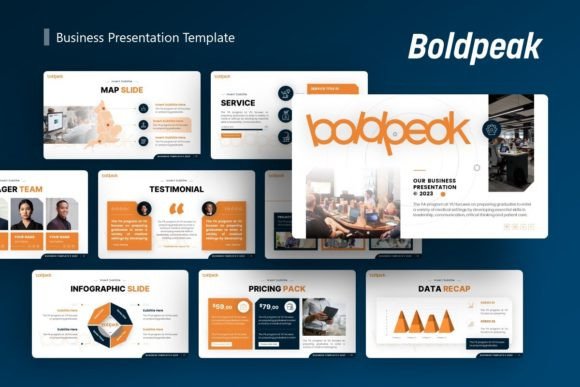
A note in the description clearly states: "All images on the demo is just for preview purpose only and not actually included on the files." This is a vital point often overlooked in the excitement of purchase. Users might expect the striking demo visuals to be part of the package, leading to disappointment and a last-minute scramble for suitable imagery. Furthermore, the "drag drop" picture placeholder feature is a convenience, but it doesn't guarantee quality. Dropping in low-resolution, poorly composed, or thematically mismatched photos into a beautiful layout will undermine the entire presentation's credibility.
The corrective action is twofold. Before your project begins, source or prepare your own high-quality images. Understand that the template provides the frame, and you must provide the artwork. Secondly, use the placeholders with intention. Ensure each image supports the slide's message. A placeholder is an invitation to add visual evidence, not just decoration. For a company profile slide, use authentic team or product photos. For a creative agency portfolio, select your strongest work. This alignment of custom content with the template's structure is what transforms Boldpeak from a generic file into a unique, authoritative presentation.
Beyond the Download: Evaluating Fit and Avoiding Scope Creep
When evaluating a template like Business Presentation - Boldpeak, the checklist shouldn't end at the number of slides or included files. A more nuanced evaluation is needed. Consider your own skill level and time. While Boldpeak is editable, do you have the bandwidth to learn its features and customize it thoroughly? For a truly time-pressed user, a simpler template with fewer options might be more efficient. Also, compare its aesthetic with your brand identity. Can the color schemes and illustration style be adjusted to match your company's branding? The vector icons are a benefit, but if your brand requires a wholly different icon set, you'll need to factor in that replacement work.
A better choice is to define your presentation's scope clearly before purchase. If your need is a one-time, simple personal portfolio, the full 36-slide breadth of Boldpeak might be overkill. Conversely, if you're a marketer who needs to produce varied presentations regularly for different clients, Boldpeak's versatility and master slide foundation become a significant long-term asset. This decision-making prevents "scope creep" where you buy a powerful tool for a minor task, or a limited tool for a major project. Always match the template's capabilities to your actual, recurring needs.
The Hidden Cost of Neglecting Narrative Flow
Even with a perfectly customized template, a final, critical mistake is treating each slide as an isolated information panel. Boldpeak provides the components—intro slides, infographic slides, conclusion slides—but it does not provide the connective thread. The overlooked detail here is the narrative flow, the persuasive journey that moves your audience from problem to solution, from question to answer. Simply arranging beautiful slides in a logical order is not enough; you must craft the transitions, the verbal cues, and the story that bridges them.
Use the template's structure to build your story. The handcrafted infographic slides are perfect for presenting a problem visually; the following text-based slides should then introduce your solution. The portfolio sections should build a case for your expertise, culminating in a clear call to action on the final slides. Think of Boldpeak as the stage set for your performance. The set is professional and adaptable, but the script—the flow of ideas, the emotional and logical pacing—is yours to write. Neglecting this turns a technically excellent presentation into a disjointed, forgetgettable one.
Making Boldpeak Work for You: A Final Checklist
To ensure Business Presentation - Boldpeak becomes a helpful tool rather than a source of frustration, adopt a constructive, step-by-step approach. First, audit your own content. Gather your text, data, and images before customization. Second, learn the framework. Review the documentation and master slides to understand how edits propagate. Third, curate, not just populate. Select only the slides from the 36 that serve your narrative, and remove or hide redundant ones. Fourth, maintain brand consistency. Adjust the template's default colors and fonts to align with your visual identity, using the master slide controls. Finally, practice the delivery. A great design amplifies a great delivery; it cannot compensate for a poor one.
By avoiding the common pitfalls of assumption, rushed customization, and narrative neglect, you can leverage Boldpeak's genuine strengths: its professional foundation, its adaptable structure, and its capacity to save design time. The result will be a presentation that feels uniquely yours, yet carries the polished authority that makes audiences listen, trust, and engage. That is the ultimate goal, and with a mindful approach, Business Presentation - Boldpeak can be a reliable partner in achieving it.